June 5, 2026
·
Updated August 9, 2026
·
12 min read
AI SEO platform vs SEO suite: selection criteria
A practical comparison to choose between an AI SEO platform and a traditional SEO suite—clarify decision context, build a weighted evaluation framework, verify content workflow and technical depth, and assess data ownership, integrations, and governance risk.

Choosing between an AI SEO platform and a classic SEO suite is rarely about “which is better.” It’s about which one matches your workflows, risk tolerance, and the way your team actually ships changes.
This comparison helps you make that call without getting dazzled by demos. You’ll learn how to define success criteria, run a fair test, pressure-check content and technical capabilities, and verify what you truly own—data sources, integrations, exports, and the governance controls your stakeholders will demand.
Decision Context
AI SEO platforms center the workflow on AI outputs: briefs, clusters, fixes, and drafts. Traditional SEO suites center it on dashboards: reports, audits, and tracking modules.
“Best” depends on your bottleneck. If you need throughput and guidance, AI-led often wins. If you need governance and repeatable reporting, suites usually fit better.
What each category is
AI SEO platforms use models to propose what to do next, then help you produce it. Classic SEO suites collect signals across SEO, then help you decide and report.
AI platforms typically bundle: topic discovery, clustering, content briefs, writing support, internal linking suggestions, and on-page recommendations. Suites typically bundle: site auditing, rank tracking, backlink analysis, keyword databases, competitor views, and reporting.
The workflow difference is the point. One pushes you toward action; the other makes you confident about decisions.
Where they overlap
Both categories cover the same core jobs, but they do them differently.
- Keyword research: AI suggests clusters; suites expose volumes and filters.
- Audits: AI prioritizes fixes; suites enumerate issues and templates.
- Rank tracking: AI explains changes; suites chart history and segments.
- Reporting: AI drafts narratives; suites standardize dashboards and exports.
- Competitive analysis: AI summarizes gaps; suites show raw comparisons.
If execution speed matters, the AI layer is the product. If auditability matters, the suite is the product.
Your decision inputs
Your constraints decide the winner faster than feature checklists. Tools are easy to buy. Change is not.
Start with goals and the work type: content scaling, technical debt, migration risk, or executive reporting. Then map budget range, team skills, your stack integrations, the approval process, and your tolerance for “AI confident, human verify.”
Pick the tool that fits how decisions get made in your org. Otherwise, adoption becomes your real project.
Evaluation Framework
You need a method that survives the sales call and the shiny dashboard. The goal is repeatable comparison, using your work and your constraints. Treat demos as inputs, not evidence.
Set success criteria
Pick the jobs you need done, then write them as outcomes you can observe in your process.
- Name your primary job: content velocity, technical quality, insights, or reporting.
- Define the artifact: brief, fix list, dashboard, or decision memo.
- Set an acceptance check: accuracy, completeness, and handoff clarity.
- List constraints: CMS limits, approvals, data access, and compliance.
- Write one “done” sentence per job.
If a tool can’t produce your artifact, features don’t matter.
Weight criteria
Different roles feel value differently, so weight by who pays the cost of failure.
- List the roles: SEO, content, engineering, analytics, leadership.
- Give each role a single vote on “must-not-break” criteria.
- Assign weights per criterion, then cap totals to force tradeoffs.
- Add a “friction weight” for setup, training, and governance.
- Record disagreements and who owns the final call.
The weights reveal politics early, before the tool becomes the battlefield.
Design a fair test
A fair trial isolates tool differences, not team differences. Use a small, real slice of your site and two workflows that represent daily pain.
Pick one segment, like a product category or a country folder. Then pick two workflows, like creating a content brief and resolving a technical issue backlog. Run both tools with the same inputs, the same timebox, and the same reviewers.
If both tools “win” on different workflows, you’re looking at a split-stack decision.
Avoid demo traps
Demos optimize for excitement, not fit, so you need explicit tripwires.
- Judging on polished templates, not your messy inputs
- Missing paid add-ons until late-stage pricing
- Believing automation without review and rollback paths
- Testing only a tiny, friendly keyword set
If the test doesn’t include failure modes, you’re buying vibes.
Content Workflow Fit
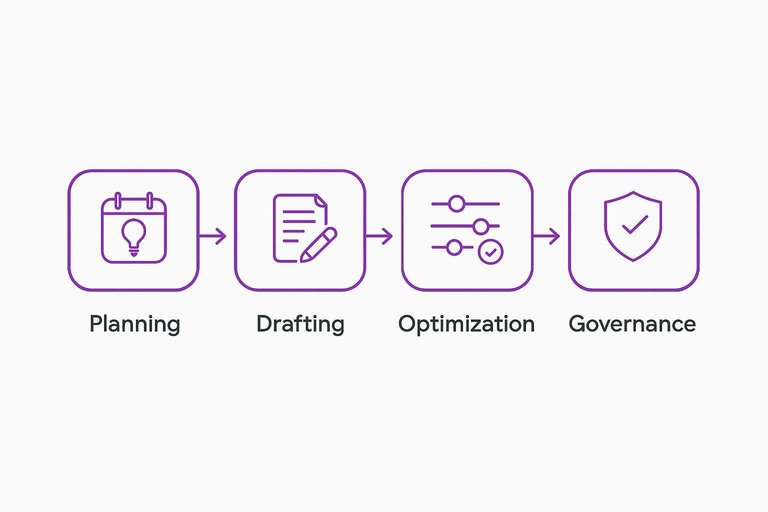
Your SEO tool choice either becomes your editorial operating system or a noisy assistant. The real test is workflow: planning, drafting, optimization, and governance across writers, editors, and SEO.
Ideation and briefs
An AI SEO platform often starts with prompts and pattern-finding, then backfills SEO constraints. An SEO suite usually starts with the SERP, then structures everything into a repeatable brief.
In practice, compare them on:
- Topic discovery inputs: SERP features, competitors, internal analytics, Search Console.
- Clustering method: keyword similarity, intent grouping, entity overlap, URL mapping.
- Brief depth: intent notes, angle, H2 outline, questions, entities, examples to include.
- Internal linking: suggested target pages, anchor patterns, orphan-page detection.
- Governance fields: priority, owner, due date, funnel stage, primary KPI.
If the brief can’t survive a handoff, you don’t have a workflow. You have hope.
On-page optimization
On-page suggestions look helpful until they push you into generic, overcooked copy. You’re judging judgment: relevance, accuracy, and restraint.
- Matches the page’s search intent
- Grounds claims in your sources
- Avoids forced keyword stuffing
- Preserves brand voice and tone
- Flags risky or unverifiable statements
Treat optimization like editing, not scoring. The safest tool is the one that says “don’t change this.”
Collaboration controls
Multi-stakeholder SEO fails on handoffs, not strategy. You need clear roles and auditable decisions across drafts, approvals, and publishing.
Look for:
- Roles that map to reality: writer, editor, SEO, legal, product.
- Approval workflows: required reviewers, conditional gates, publish permissions.
- Versioning: diff views, rollback, change attribution.
- Commenting: threaded notes, task assignment, resolution tracking.
- Integrations: CMS, Google Docs, Notion, Jira, Asana, Slack.
If your tool can’t show who approved what, you’ll re-litigate every change. Every time.
Scale and quality gates
Publishing faster only helps if quality stays predictable. Build gates that catch issues early and force the right humans into the loop.
- Lock templates for each content type, including required sections.
- Apply a QA checklist for intent, entities, links, and claims.
- Enforce plagiarism and originality checks before editorial review.
- Require human sign-off for accuracy, voice, and sensitive topics.
- Audit a sample each week and update the checklist.
Velocity without gates is just faster mistakes. Put your standards in the system.
If you’re building policies for AI-assisted production, align your gates with Google’s guidance on scaled content abuse—and consider reviewing top tools to supercharge workflows to tighten handoffs and quality controls.
Technical SEO Depth
Technical SEO depth is where “insight” either becomes “shipped” or dies in a dashboard. You’re judging whether an AI SEO platform or a classic suite can crawl like Google, diagnose like an engineer, and hand your team tickets they trust.
Crawling and diagnostics
Crawling is the tool’s ground truth, and bad crawls create confident nonsense. You want coverage that matches your stack, plus diagnostics that point to fixable causes.
Look for clear crawl limits and controls, including scope rules, URL patterns, and duplicate handling. Confirm JavaScript rendering options, including rendered HTML comparisons and blocked resource detection. Check for log file ingestion or integrations, because bot behavior beats guesswork. Prioritization should weigh impact and effort, not just count errors.
If the tool can’t explain what it actually saw, it can’t tell you what to change.
Recommendations quality
Recommendations are only useful when they’re specific, defensible, and safe to deploy. You’re testing whether the tool can explain “why” without hallucinating.
- Explains root cause, not just symptoms
- Minimizes false positives with evidence
- Offers platform-safe fixes and caveats
- Distinguishes urgent from cosmetic issues
- Shows examples of affected URLs
If engineers argue with the tool every sprint, you’ll stop opening it.
Workflow to fixes
A strong tool shortens the path from detection to deployment. You’re evaluating whether it fits your team’s existing loop.
- Triage issues by impact, effort, and owner.
- Generate a ticket with context, URLs, and acceptance criteria.
- Assign an engineer and link the code change.
- Validate the fix with a re-crawl or automated checks.
- Monitor regressions with alerts and scheduled audits.
If it can’t close the loop, it’s not technical SEO tooling. It’s reporting.
Enterprise constraints
Enterprise SEO lives inside identity, permissions, and change control. Your best technical recommendations are useless if the tool can’t operate within governance.
Check SSO support and granular roles, including who can edit rules, integrations, and crawl scopes. Multi-site handling should separate properties while enabling shared templates and rollups. Staging support matters, because you want to test fixes before production crawls. Regulated teams need audit trails, approvals, and predictable change history.
The winner is the tool your security team approves and your engineers can actually use.
Data, Integrations, Ownership
Your AI SEO platform is only as trustworthy as the data it ingests and the paths it can take back out. If your team can’t trace metrics, connect the stack, and keep history portable, you’re renting decisions.
Source transparency
You need to know which numbers are observed versus inferred, because they drive different levels of confidence. A click count from Search Console is first-party; a “traffic potential” score is an estimate.
Ask for a clear map of metrics:
- First-party: GSC clicks, impressions, queries, pages
- Measured: your analytics sessions, conversions, revenue events
- Derived: CTR, content clusters, cannibalization flags
- Estimated: search volume, difficulty, “share of voice” proxies
Then probe the mechanics that change the story:
- Sampling: when totals differ from raw logs
- Refresh rates: how fast new pages and query shifts appear
- Localization: country, device, language, and SERP feature differences
If the vendor can’t explain those knobs, your “insights” are just vibes.
Integration checklist
Integrations decide whether your tool becomes a system of record or another dashboard. Check connectors you’ll use weekly, not “nice to have” someday.
- Search Console: properties, query/page exports, API limits handling
- Analytics: GA4 events, conversions, channel definitions alignment
- Data warehouse: BigQuery, Snowflake, Redshift, Postgres sync
- CMS: WordPress, headless CMS, publish status, metadata writes
- Crawlers: ingest crawl data, log files, or run native crawling
If it can’t connect to where truth lives, it will create its own truth.
For reporting outside the vendor UI, many teams rely on BI tooling—see how to connect Looker Studio to Search Console.

Export and portability
Portability is your insurance policy, especially when workflows and models change. You want APIs and exports that preserve history, not just pretty reports.
Look for:
- APIs with stable schemas and sane rate limits
- Raw exports for rankings, keywords, pages, and annotations
- Custom fields you can carry across tools
- Ownership clarity for generated briefs, outlines, and internal links
Imagine switching vendors after a year and losing every tag, note, and decision trail. If that sounds painful, negotiate portability before you commit.
Governance and Risk
AI SEO platforms don’t just write content. They touch customer data, publish to production, and create legal exposure.
Your decision lives or dies on controls. Not features. That’s especially true for tools that can publish directly to WordPress—capabilities like Skribra’s are powerful, but they raise the bar on governance because the platform becomes part of your production path.
Security posture
Treat SEO automation like any other production system. If it can publish, it can also leak, overwrite, or misconfigure.
- Support SSO and role-based access
- Provide SOC 2 or ISO documentation
- Define retention and deletion controls
- Encrypt data in transit and at rest
- Offer tenant isolation and audit logs
If a vendor can’t prove these, assume you’ll own the incident. And if you’re using WordPress integration for one-click publishing, be extra strict about permissions, audit trails, and separation of duties—publishing convenience shouldn’t come at the cost of production-grade access control.
AI policy alignment
Your AI policy is a system constraint, not a suggestion. The platform should enforce it, even when users get creative.
Look for controls like:
- Prompt and data handling rules
- Source citations or linkable references
- Hallucination checks and guardrails
- Human approvals before publish
If policy lives in a PDF, the tool will route around it. This matters even more with “daily publishing” workflows: the easier it is to generate SEO content at scale, the more you need policy-aligned guardrails that consistently show up in the draft itself (structure, sourcing expectations, and pre-publish checks).
Brand and legal review
Some pages can’t be “good enough.” Regulated industries, YMYL topics, and competitive claims need a narrower lane.
- Classify pages by risk level before drafting.
- Route high-risk drafts to legal or compliance review.
- Require citations for factual or medical claims.
- Enforce final human approval before publishing.
- Log decisions and keep review artifacts.
The workflow is the protection. The model is just a contributor. If a platform is generating SEO-optimized posts with metadata (titles, meta descriptions, formatting) ready for CMS publish—as Skribra does—make sure those “ready-to-ship” outputs still flow through the right review gates for your highest-risk categories.
Operational reliability
Automation fails in new ways. Model changes can shift tone, and deprecations can break a workflow overnight.
Ask about SLAs, support escalation, model update notices, and rollback options. Also map what happens when the tool is down during a release window.
If outages stop publishing, you don’t have an SEO tool. You have a single point of failure. This is also where integrations matter: if you rely on WordPress publishing, webhooks, or automated image generation, confirm how failures are handled (queued jobs, retries, partial publishes) so “hands-off” doesn’t become “hard to recover” when something breaks.
Side-by-Side Comparison
You’re usually choosing between speed of execution and depth of control. Use this table to pressure-test what matters for your team, workflow, and risk tolerance—and if you’re evaluating vendors, this AI content platforms comparison can help you narrow options.
| Criterion | AI SEO platform | SEO suite | When it wins |
|—|—|—|
| Primary value | Automated recommendations | Full workflow control | Execution vs governance |
| Best for | Lean teams | SEO programs | Solo vs cross-functional |
| Core features | Briefs, drafts, scoring | Research, audits, tracking | Content vs ops |
| Risk profile | More model variance | More manual effort | Speed vs certainty |
| Integration fit | API-first, CMS hooks | Broad connectors | Dev-led vs tool-led |
If two or more “When it wins” cells point the same way, your choice is already made.
Make the Decision Testable, Then Commit
- Write your non-negotiables: required workflows (content + technical), must-have integrations, and governance constraints (security, legal, brand).
- Turn them into a weighted scorecard and run the same real tasks in both tools—brief creation, optimization, crawl/diagnostics, ticket-to-fix flow, and exports.
- Validate ownership and risk: data sources and transparency, portability if you switch, access controls, audit trails, and reliability expectations.
- Pick the product that wins on your highest-weight criteria, then pilot it with clear success checks and a defined rollback plan.
Frequently Asked Questions
- Can an AI SEO platform replace my SEO suite, or do most teams run both?
- Most teams run both: an AI SEO platform for content ideation, drafting, and on-page guidance, and an SEO suite for rank tracking, competitive research, and sitewide reporting. Replacing a suite usually works only if your requirements are heavily content-led and you already have separate analytics and technical SEO coverage.
- What’s the quickest way to validate an AI SEO platform before committing to a yearly plan?
- Run a short pilot on a small, representative set of pages (e.g., one cluster) and evaluate output quality, edit burden, and how easily you can publish and measure results in Google Search Console and GA4. Require exports or API access during the pilot so you can confirm you can keep your data if you switch tools later.
- How do I measure whether an AI SEO platform is actually improving SEO, not just producing more content?
- Track leading indicators (indexation, crawl discovery, impressions, and query coverage in Google Search Console) and then confirm impact with sustained changes in rankings and organic conversions in your analytics. Compare against a baseline and monitor page-level performance to separate real gains from seasonality or publishing volume.
- If I already have Surfer/Frase/Clearscope, do I still need an AI SEO platform?
- Those tools are usually focused on optimization scoring and briefs, while an AI SEO platform often adds end-to-end workflow (topic pipeline, drafting, governance, publishing, and integrations). You still benefit from a platform if your bottleneck is production and collaboration rather than on-page tuning.
- What should I look for in an AI SEO platform if my priority is publishing to WordPress at scale?
- Prioritize native WordPress integration or a stable webhook, controllable templates (headings, schema fields, internal links), and an approval workflow so drafts don’t auto-publish without review. If daily publishing is your main constraint, a tool like Skribra can fit when you want AI-generated articles pushed to WordPress with minimal manual steps.
Turn Criteria Into Content Output
Once you’ve compared an AI SEO platform against an SEO suite, the real test is whether it can execute your workflow consistently with the right controls.
Skribra generates SEO-optimized articles daily and publishes to WordPress with built-in governance-friendly workflows—take advantage of the 3-Day Free Trial to validate fit fast.
Written by
Skribra
This article was crafted with AI-powered content generation. Skribra creates SEO-optimized articles that rank.
Share: