September 10, 2026
·
9 min read
Byword vs. Skribra: SEO Content Generation Workflows
A workflow-first comparison that settles whether Byword or Skribra fits your SEO content operations — generator vs autopilot, side-by-side workflow from keywords to publishing, webhook push vs API pull integration and update sync, IndexNow vs Google Indexing API reality check, and post‑publish governance plus a 2–4 week pilot protocol so you can predict the real operational load before you commit.

You’re trying to scale SEO content without turning your team into a publishing factory. The hard part isn’t getting a draft on the page—it’s knowing who owns the steps around it: keyword intake, approvals, how content reaches your CMS, and what happens when you need to update dozens of live posts.
If you pick the wrong workflow, you pay for it in rework, stale pages, and “published” articles that still don’t get discovered. This comparison breaks down Byword and its counterpart step-by-step, including integration models, what indexing automation can and can’t do (IndexNow vs the Google Indexing API), and the post‑publish governance you’ll need—ending with a tight 2–4 week pilot you can run safely.
What You’re Buying
Avoid name confusion
If you’re comparing “Byword vs. Skribra,” first make sure you’re comparing the right Byword. There’s an Apple-era Markdown writing app called Byword; that’s a local editor, not an SEO system. This article is about Byword AI—the SEO content generator at https://byword.ai/pricing/ (nofollow).
Byword AI is sold like a production engine: you pay for a monthly article allowance (for example, Starter is $99/month for 25 articles), and you can also start free with 5 article credits. That framing matters because it sets an expectation: you’re buying throughput you can aim at keywords you choose.
Generator vs autopilot
The real decision isn’t “which tool writes better.” It’s which workflow owns the work before and after publish.
A generator-driven workflow is operator-led: your team decides what to target, triggers generation (single articles, bulk campaigns, or template/dataset runs), and treats publishing as an output step. The tool helps you produce and route content, but your team remains the system of record for what gets made, what ships, and what gets updated.
An autopilot system takes ownership of the loop: it generates a keyword set and rolling calendar, publishes to your site, and then comes back to refresh live posts based on performance signals. For example, Skribra explicitly supports publishing to WordPress, Webflow, Notion, or a webhook, and describes agents that (a) refresh the most-stale article on a daily schedule and republish it, and (b) detect cannibalization issues and wait for your approval on actions.
If you can’t say who owns “after it goes live,” you’re not choosing between tools—you’re choosing between operating models.
Workflow Side-by-Side
On the “happy path,” the difference isn’t the first draft—it’s (1) who chooses targets and (2) what coordination work your team still owns once content is shipping (inputs, approvals, and keeping live URLs in sync). For publish, note the two integration shapes: webhook push (tool sends your server the article) vs API pull (your site fetches the article at render time). If you’re evaluating how these shapes impact ops, see tools to supercharge content workflows.
| Stage | Byword AI happy path | Autopilot (Skribra) happy path | Stage winner → what your team does weekly |
|---|---|---|---|
| Inputs | You provide targets: keywords/titles, templates, datasets; set voice rules | You provide site + destination; system drives the queue | Autopilot → fewer “what’s next?” meetings |
| Keyword research / selection | Operator-led: you decide what to go after; tool is a workbench | System-led: topics/targets come from the autopilot loop | Autopilot → less manual prioritization |
| Writing control | Custom voice profile training from samples (URL/text/upload); 500–2,000 words of training data is a “Good start” | Output spec drift: the About page says “Every article is 1000–1500 words” and frames it as “one plan, one price,” while the homepage lists multiple tiers | Byword → stronger brand/voice governance; Autopilot → watch spec drift |
| Publish path | Publish via integrations/webhooks (note: integrations are paid-plan only) | Publish via webhook push or API pull; API docs expose endpoints like GET /v1/articles/:slug on https://api.skribra.com/v1; native publish options called out include WordPress/Webflow/Notion/webhook | Tie → Byword wins on “workflow you own”; Autopilot wins on “system stays source of truth” |
| Weekly team workload | Keyword pipeline + batch QA + scheduled publishing runs; volume scales with your plan (25/80/300 articles per month on Starter/Standard/Scale) | Review what shipped, spot-check formatting/brand, and handle any approval queues when the system flags issues; volume is capped by tier (Starter/Growth/Pro are 5/12/30 articles per month) | Autopilot → staff for review queues. Byword → staff for batching and scheduling. |
Integration Models
Integration choice becomes load-bearing the moment articles get refreshed after they’re live. If your generator/autopilot republishes updates on a schedule, you’re no longer solving “how do we publish?”—you’re solving “what is the source of truth when versions change?”
Native CMS publishing (WordPress-first). The tool writes directly into your CMS as posts/pages. This is the lowest-friction path when WordPress is your system of record and humans will do final edits there—especially when the platform is designed for that workflow (for example, Skribra’s WordPress integration). What breaks on refresh is ownership: if the tool re-publishes the same URL later, it can overwrite in-CMS edits, reset formatting, or roll back fields your editors changed (titles, blocks, featured images). The only stable setup is a rule: either “CMS edits win” (tool never touches published posts again) or “tool wins” (edit in the tool, not in WordPress).
Webhook push. A webhook is push publishing: at publish time the tool sends your server an HTTP POST; you must receive it, store it, and serve the content from your copy. This fits custom stacks (or when you need validation and QA gates), and it’s also a practical escape hatch when you want an autopilot’s output to flow through your own review/transform steps before it reaches production. But refreshes will break unless you implement idempotent upserts—same slug/ID must update the same record, not create a duplicate.
API pull. API pull is render-time publishing: your site requests the latest article content at render/build time, so updates appear without re-ingesting data. That’s cleanest for headless builds, but it turns availability and caching into publishing problems—your build/CDN must know when to revalidate.
If you’re evaluating an autopilot that explicitly refreshes the “most-stale” article daily and republishes it, and can propose cannibalization fixes that wait for approval, API pull or a disciplined webhook pipeline prevents stale-copy drift better than “edit anywhere” native publishing.

Indexing Reality Check
IndexNow—an open protocol where a site notifies participating engines that URLs were added/updated/deleted—only reaches the engines in IndexNow’s own participant registry. That list includes endpoints like Bing, Yandex, Seznam, Naver, Yep, Internet Archive, Amazonbot, and others; Google isn’t on it. So “IndexNow auto-indexing” is real, but it’s real for those participating crawlers, not as a direct line into Google.
Google’s Indexing API—Google’s API for notifying about job posting and livestreaming event pages—isn’t a general “submit any new blog post” endpoint. Google documents its scope as pages with JobPosting or BroadcastEvent embedded in a VideoObject, which is a very specific set of page types. That’s why “instant indexing” talk gets confusing: IndexNow can accelerate discovery for IndexNow engines, while Google still largely runs on its normal discovery → crawl → index pipeline for ordinary articles.
Where the two workflows differ is what they claim to automate for discovery:
Skribra positions IndexNow submission as part of the autopilot publish loop: new URLs get pushed to the IndexNow network right after publish, so participating engines can pick them up sooner.
Byword’s indexing feature claims Google Indexing API submission and even shows a default of “200 URLs per day.” To do that reliably, you typically authenticate with a service account—a Google Cloud identity used by servers/apps to call Google APIs—and grant it access via Google Search Console.
If your content is standard SEO articles (not jobs or livestream events), treat both as “discovery assists,” not guarantees: IndexNow affects its own network, and Google may ignore Indexing API notifications outside the documented scope.
Post-Publish Governance
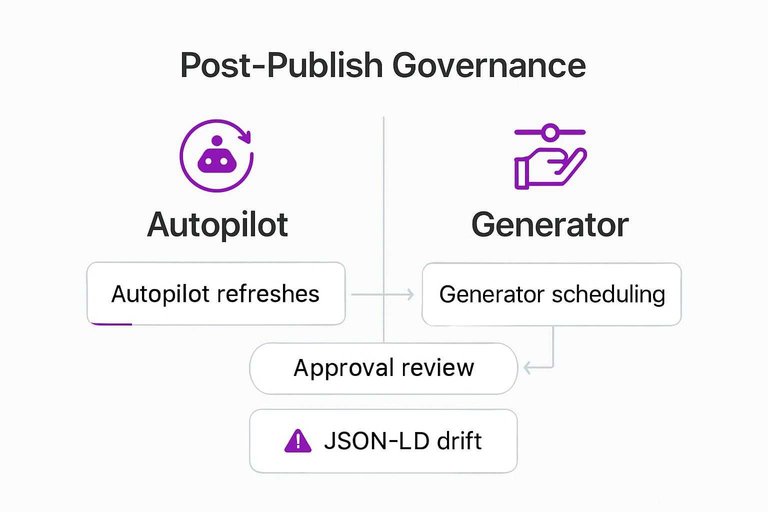
Post-publish is where the “generator vs autopilot” choice stops being philosophical and becomes operational risk. The key question isn’t whether an article was good on launch day—it’s who is allowed to change live URLs, and what has to be reviewed before those changes ship.
On the autopilot side, Skribra makes the cadence explicit: its Keeper agent refreshes the “most-stale” article on a daily schedule and republishes it, pacing updates across your monthly budget. That’s real automation, but it also means you’re opting into a world where titles, meta descriptions, internal links, and even structured elements can shift without a human opening the CMS first—so you want clear rules about when the autopilot can touch already-live posts (and a simple AI content checklist for marketers to standardize what gets reviewed before changes go live).
That’s why approvals become the governance line. Curator is positioned to catch cannibalization—when multiple pages on the same site compete for the same query intent, splitting signals and making it unclear which URL should rank—and then recommend concrete actions (rewrite, 301 redirect, noindex, remove) while waiting for your approval. “Noindex” is the simplest of those levers: it tells search engines not to index a page, which can de-conflict intent without deleting content.
Byword is the opposite posture: a generator you operate. Nothing refreshes unless your team schedules it, and nothing rewrites titles/metas or reworks internal links unless you deliberately regenerate and republish. That’s more ongoing labor, but it’s also cleaner for compliance-heavy brands because you can put review gates wherever you need them.
One more gotcha to govern either way: don’t let refreshes silently break your JSON-LD— a structured-data format embedded in pages to describe content entities to search engines—because schema drift is the kind of change you only notice after rankings wobble.
2–4 Week Pilot
Use Skribra’s 3-day free trial to get connected, then run a 2–4 week pilot on a tiny slice of your site (think one topic cluster) to validate publish + refresh + approval mechanics.
-
Integration dry run (days 1–2): Publish one article to staging, then publish it again to the same slug/ID. Confirm you get an update (not a duplicate), and write down the source-of-truth rule: “CMS edits win” or “tool edits win.”
-
Approval gates (week 1): Decide what requires a human sign-off (title/meta, internal links, schema, “noindex/redirect” actions). Route one article through the full approval path before anything hits production.
-
Indexing expectations (week 1): Verify you can see submission events for new URLs and for refreshed URLs. Treat submissions as notifications, not indexing guarantees.
-
Refresh behavior (weeks 2–3): Let at least one refresh land, then confirm it preserves your required fields and doesn’t break JSON-LD.
-
Go/no-go rule (week 4): Go only if publish + refresh are repeatable, auditable, and easy to stop (“Cancel any month” should be true in practice, not just in pricing copy). If you need humans to own every post-publish change, use an operator-led generator like Byword (Starter is $99/month for 25 articles): https://byword.ai/pricing/ (nofollow).
Choose who owns updates
Pick based on who you want running the post‑publish loop. If you want the system to keep shipping and refreshing live URLs—while you manage approvals for things like cannibalization actions—Skribra’s autopilot model is the cleaner operating fit, as long as you enforce a single source of truth and test refreshes against your CMS and JSON-LD. If you need humans to own every change after an article goes live (or you want tighter voice governance and scheduled, operator-led updates), Byword is the better choice—but remember its CMS integrations are paid-plan only (https://byword.ai/pricing/ rel=“nofollow”). Either way, start with the integration dry run: publish one article to staging, republish to the same slug/ID, and confirm it updates instead of duplicating—because that’s where “scaling content” usually breaks.
Frequently Asked Questions
- Is Skribra’s backlink exchange network safe for SEO, or is it considered link spam?
- Treat any backlink exchange as a policy-risk area: Google’s spam policies explicitly call out “excessive link exchanges” as link spam, so you need hard guardrails like relevance, editorial justification, and strict limits on volume.
- Can Byword AI match my brand voice as reliably as an autopilot like Skribra?
- Byword AI supports custom voice profiles trained on samples you upload, paste, or add by URL, with its docs stating that 500–2,000 words of training data is a “Good start.” That makes it a better fit when you want tight operator-controlled voice governance.
- Do I need OAuth to connect Skribra (or Byword) to my CMS, or can I publish without it?
- You only need OAuth when an integration requires delegated access to a third-party account; webhook publishing avoids OAuth because your site just receives an HTTP POST and stores the content. If you already have a custom stack, a webhook is the simplest way to keep credentials out of the tool.
- How many articles per month does Skribra publish on each plan, and what does it cost?
- Skribra’s homepage lists Starter at $19/month for 5 articles, Growth at $39/month, and Pro at $75/month for 30 articles, plus a $199 one-time BYOK option. Use those caps to size review capacity before you automate publishing.
- What’s the pricing difference between Byword AI’s higher-volume plans and Skribra’s monthly tiers?
- Byword’s pricing page lists Standard at $299/month and Scale at $999/month, which frames it as a higher-throughput generator you operate. If your bottleneck is approvals and post-publish changes, a lower monthly cap can be easier to govern than raw volume.
Automate the post‑publish loop
Once your staging republish test is clean, the real work is keeping a rolling calendar, getting pages indexed, and refreshing live posts without creating coordination drag.
Skribra runs keyword research, writes long‑form articles, publishes to WordPress/Shopify/Webflow/Notion (or a webhook), and updates live posts based on performance data—so you can validate the workflow in a 3‑Day Free Trial.
Written by
Skribra
This article was crafted with AI-powered content generation. Skribra creates SEO-optimized articles that rank.
Share: