August 26, 2026
·
10 min read
How to Set Up Autoblogging: 9 Steps to Publish Daily
A step-by-step guide to setting up autoblogging so you can publish daily without sacrificing control—define goals and quality rules, compare automation methods, build a solid WordPress base, curate reliable sources, choose the right tools, and assemble a repeatable post pipeline.

Publishing every day sounds simple—until you’re the one hunting for topics, formatting posts, and hitting “publish” on schedule. Without a system, daily posting quickly turns into rushed content or missed deadlines.
This guide breaks autoblogging into a clean, manageable workflow: you’ll set a realistic daily goal, choose an automation method that fits your risk tolerance, build a dependable site foundation, curate trustworthy sources, and create a pipeline that still leaves room for SEO, internal links, and compliance checks.
Define Your Daily Goal
Daily autoblogging only works when your target is concrete. Pick a number, a scope, and a clear definition of “done.” Without that, automation multiplies chaos.
Choose your niche
A tight niche keeps daily publishing from turning into daily guessing.
- Solve a clear audience problem
- Confirm steady topic availability
- Match monetization to intent
- Ensure you can verify accuracy
Nail the niche first, and every later automation choice gets easier.
Set post template
A template turns your workflow into an assembly line.
- Set a target length range and stick to it.
- Define sections you always include, in the same order.
- Lock tone rules, like “direct” or “friendly technical.”
- Require specific elements, like FAQs or a summary box.
- Create a final “publish-ready” checklist for each draft.
When every draft looks the same, editing becomes fast and mechanical.
Decide quality rules
Daily output only helps if your baseline stays credible. Write down non-negotiables before you automate anything.
Require sources where claims appear, run originality checks, and include affiliate disclosures when relevant. Always do a minimum human editing pass for accuracy, clarity, and obvious gaps.
Your rules are your guardrails, and guardrails let you scale safely.
Pick publishing cadence
A cadence is a calendar rule, not a mood.
- Publish weekdays only, rest weekends
- Publish daily, queue weekend posts
- Plan seasonal spikes, then normalize
- Define a make-up rule for missed days
Protect the cadence, and your system stays predictable under stress.
Pick an Autoblogging Method
You need a method you can run every day, even when you’re busy. The best choice balances control, risk, and how much editing you can afford.
| Method | What it pulls from | Your effort | Best for |
|---|---|---|---|
| RSS aggregation | Full feed items | Low | News roundups |
| AI-assisted drafting | Your prompts + sources | Medium | Explanatory posts |
| Hybrid curation | Feed + AI + edits | Medium-high | Niche authority |
| Manual-first automation | Your outline + templates | High | Brand voice |
Pick the workflow you can sustain on your worst week, not your most motivated one. If you’re scaling output, make sure your process avoids scaled content abuse.
Set Up Your Site Base
Autoblogging stresses your setup. A shaky WordPress base turns “publish daily” into “fix daily.”
Get hosting, theme, and core settings boring and reliable. Then automation stays focused on content, not repairs.
Install WordPress
Do this once, correctly, so automation isn’t running on sand.
- Choose a host with SSL support, backups, and easy WordPress installs.
- Enable SSL and force HTTPS before you publish anything.
- Install WordPress and set a non-default database table prefix.
- Create an admin user with a unique username, strong password, and 2FA.
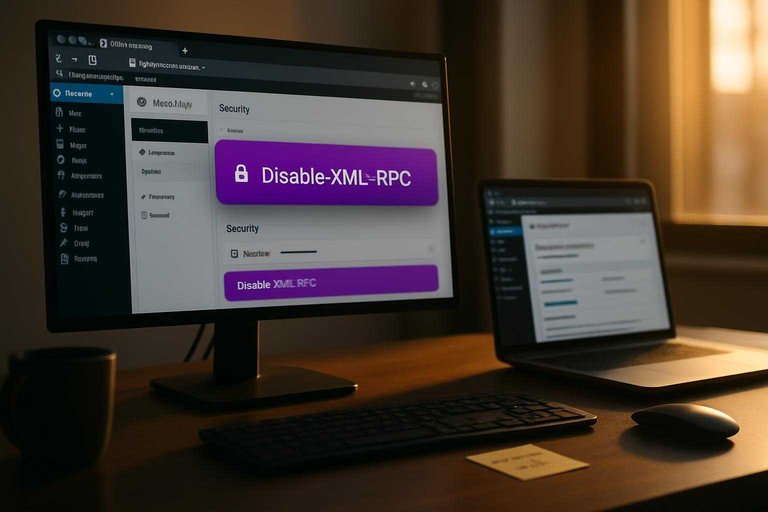
- Disable XML-RPC if you don’t need it, and limit login attempts.
If your admin access is weak, daily publishing just amplifies the risk.
Configure essentials
Lock these settings early so every automated post lands cleanly.
- Set permalinks to “Post name” for readable, stable URLs.
- Set timezone, date, and time formats to match your audience.
- Set discussion defaults to your moderation tolerance, not WordPress defaults.
- Set media sizes and disable auto-scaling quirks you won’t use.
- Set search visibility correctly, and confirm robots.txt behavior.
Autoblogging fails quietly when your defaults are wrong, because every post inherits them.
Add core plugins
Start with a minimal stack you will actually maintain.
- SEO plugin for titles, schema, and sitemaps
- Caching plugin for faster page loads
- Security plugin for firewall and login hardening
- Backup plugin with off-site storage
- Editorial plugin for drafts, scheduling, and approvals
Every plugin is a liability unless you update it like it matters.
Create categories
Categories are your autoblogging rails. They decide where posts go, how users browse, and how your internal links form.
Start from your niche map, then create a small set of categories that match content sources. For example, a tech site might use “Reviews,” “How-To,” and “News,” with tags for brands and models.
If you want the structure to pull its weight in rankings too, follow a simple SEO guide for site structure before you lock anything in.
Predictable taxonomy makes automation feel intentional, not random.
Collect Reliable Content Sources
A daily autoblog lives or dies on inputs. Build a source library that stays fresh, stays legal, and stays worth reading. Even if you’re using an AI workflow (for example, a platform like Skribra that can structure posts with keywords, meta descriptions, and formatting), the quality and permissions of what you feed in still determine whether the output is trustworthy and sustainable.
Create source criteria
You need filters before you collect links. Otherwise you’ll stockpile noise, and your drafts will all sound the same.
Start with four checks:
- Credibility: clear author, editorial standards, and traceable claims.
- Update frequency: recent posts and a consistent cadence.
- Permissions: explicit terms, licensing, or allowed quoting.
- Usability: content you can summarize, not just copy.
Treat your criteria like a gate, not a guideline. If a source fails one check, it’s out. This matters even more when your publishing is automated, because speed amplifies mistakes as easily as it amplifies output.
Build RSS list
Capture feeds once, then let them run.
- Find the RSS feed via the site footer, /feed, or a feed discovery tool.
- Validate the feed in a reader to confirm items load correctly.
- Group feeds by topic cluster so scheduling stays balanced.
- Document each feed URL, topic, and notes in one source sheet.
- Add a “last checked” field to keep the library healthy.
Your source sheet becomes your publishing engine. Keep it clean, and the rest gets easier—especially if you’re pushing content into WordPress on a schedule, where a tidy feed library reduces manual intervention later.
Plan keyword buckets
Feeds won’t cover everything you need. Keyword buckets keep output steady when the news slows.
- Pick 3–5 core topic clusters.
- Add seed keywords for each cluster.
- Include “evergreen how-to” phrases.
- Add comparison and alternatives terms.
- Reserve a bucket for seasonal spikes.
Buckets give your AI a map, not a vibe. That’s how you avoid random posts. If your tooling supports SEO scaffolding (titles, meta descriptions, formatting), buckets also make those elements more consistent across your daily pipeline.
Set source rotation
Rotation rules prevent accidental plagiarism-by-repetition. They also keep your site from feeling like a single outlet republished.
Use simple constraints:
- Daily mix across multiple topics.
- Per-source caps so one feed never dominates.
- A fallback tier of secondary sources.
- A “cooldown” window before reusing the same source.
If your rotation feels strict, good. Consistency beats variety that looks suspicious—and clear rotation rules pair well with automated publishing systems because they reduce the odds of your AI drawing too heavily from the same small pool day after day.
When you’re evaluating “Permissions,” it helps to understand common licensing options like the Creative Commons license types before adding a source to your library.
Choose Automation Tools
You’re picking the parts that run your publishing line. Get this wrong, and “daily posts” becomes daily babysitting.
RSS import plugin
You need a reliable way to pull RSS items into WordPress without creating a mess. The right plugin prevents junk, duplicates, and off-topic imports.
- Filter by keywords, tags, or source
- Map feeds to categories automatically
- Schedule imports with staggered timing
- Detect and block duplicates
- Skip short or empty items
If filtering and deduping feel optional, you’ll learn otherwise after your first spammy import.
AI writing integration
Decide where AI runs before you write a single prompt. The location changes latency, cost control, and how much context you can pass.
A WordPress plugin is simple, but it can be limiting. Zapier or Make helps you chain steps, while an external API gives maximum control. Pass the same input every time: title, source URL, full text, category, and your style rules.
The real win is consistency, not creativity.
Image workflow
Images break automation faster than text does. You need a repeatable path that respects licensing and keeps pages fast.
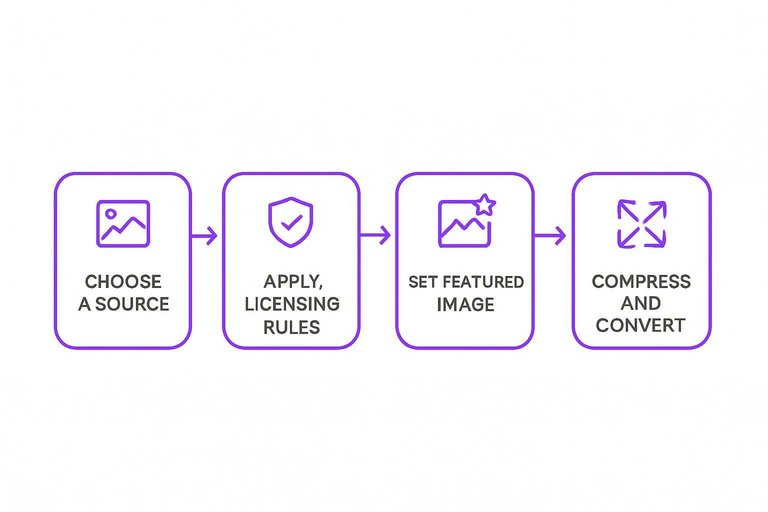
- Choose a source: generated images, stock library, or feed-provided media.
- Apply licensing rules: allowed sources only, store attribution when required.
- Set a featured image automatically, with a safe fallback image.
- Compress and convert formats before upload, then enforce max dimensions.
- Add alt text from the draft title, then flag sensitive topics for review.
If your images aren’t controlled, your “autoblog” becomes a legal and performance risk.
Automation limits
Automation needs brakes, not just an accelerator. Without guardrails, one bad feed or loop can flood your site.
Set a maximum posts-per-day cap, plus per-feed rate limits. Add cost caps for AI usage, and require failure notifications for import errors, image failures, or publishing blocks. Also log every run, so you can trace what happened.
Your best automation is the one that fails loudly and stops early. If you’re still deciding what to stack together, see essential content automation resources.
Build Your Post Pipeline
Autoblogging fails when your workflow is fuzzy. You need a pipeline that turns each feed item into a reviewable draft, then a publish-ready post.
Draft from feed
Convert each RSS item into a WordPress draft the same way every time.
- Pull the item title, source, publish date, and original URL.
- Create a WordPress draft with the title and a short excerpt.
- Add a prominent canonical link to the original URL.
- Add attribution in the byline or footer, plus the source name.
- Store the raw source text in a note field for reviewers.
If you can’t trace a post back to a single URL, you can’t defend it.
Rewrite and enrich
Aim for “useful even if the reader never clicks out.”
- Write a 2–4 sentence summary in your own words.
- Add one paragraph of context your audience cares about.
- Pull 3–5 key takeaways as bullets inside the draft.
- Add 1–2 internal links that support the main point.
- Add a short opinion or practical next step.
The win is editorial value, not faster republishing.
Add SEO fields
Fill the same fields every time so quality doesn’t drift.
- Set a clear focus topic phrase
- Write a human meta title
- Write a specific meta description
- Structure headers for skimmers
- Add basic schema where relevant
- Add alt text to images
Consistency beats cleverness when you publish daily.
Insert internal links
Internal links are your distribution system. They also tell search engines what you actually care about.
Link to one cornerstone page when the post naturally depends on it. Then add one link to a recent post that extends the idea, using plain-language anchors like “pricing checklist” or “setup guide,” not exact-match stuffing.
If the anchor reads like an ad, rewrite it.
Apply compliance checks
Daily publishing amplifies small mistakes. Add a quick checklist before anything goes live.
- Confirm you own or license media
- Quote small, attributed excerpts only
- Avoid copying structure and phrasing
- Add affiliate or sponsorship disclosures
- Ensure canonical and source are visible
When in doubt, write more original text, not fewer warnings.
Launch Your Daily Autoblog the Right Way
- Start with one category and one source set: publish for 7–14 days to validate pacing, formatting, and quality rules before expanding.
- Lock your guardrails: enforce templates, minimum edits/enrichment, attribution/compliance checks, and clear “don’t publish” conditions.
- Automate only the repeatable parts: let tools handle importing, drafting, and scheduling—keep final review, internal linking, and SEO fields under your control.
- Review weekly and refine: prune weak sources, adjust keyword buckets, update your template, and tighten automation limits as you scale to daily output.
Frequently Asked Questions
- Is autoblogging still safe for SEO in 2026, or will it trigger Google penalties?
- Autoblogging is usually fine for SEO when it produces original, helpful pages with clear value-add (context, summaries, comparisons) and avoids mass-duplicated or spun content. The risk comes from publishing thin or duplicate posts at scale, not from automation itself.
- How do I prevent autoblogging from publishing duplicate content or near-identical posts?
- Use canonical URLs when you must reference a source, add unique commentary or synthesis, and run a duplication check before publishing (e.g., Copyscape or Siteliner). Also set rules to block reposting the same topic/URL and refresh older posts instead of reprinting them.
- How can I measure whether my autoblogging setup is actually working?
- Track Google Search Console (indexing, impressions, queries), analytics (organic sessions, engagement), and a rank tracker for target topics, then review which post types earn clicks and retention. The most useful signal is consistent growth in indexed pages and impressions without a drop in quality metrics.
- How often should I review or edit autoblogged posts if I'm publishing daily?
- Do a quick pre-publish check for accuracy, duplication, and formatting, then schedule periodic audits to update outdated posts and consolidate overlapping topics. Most sites benefit from reviewing the highest-traffic and newest posts first, since errors and thin content compound fastest there.
- Can I autoblog directly to WordPress without using a bunch of plugins?
- Yes—many workflows publish via the WordPress REST API or a dedicated WordPress integration, which can reduce plugin bloat and conflicts. If you want AI drafts plus direct WordPress publishing in one place, a platform like Skribra can handle generation and push posts to your site through its integration.
Automate Your Daily Publishing
Setting up autoblogging is straightforward on paper, but keeping a reliable daily pipeline running takes tools, sources, and repeatable workflows.
Skribra generates SEO-optimized articles, auto-formats them, and publishes to WordPress so you can maintain daily output—start with the 3-Day Free Trial.
Written by
Skribra
This article was crafted with AI-powered content generation. Skribra creates SEO-optimized articles that rank.
Share: