October 17, 2026
·
11 min read
Seobot Pricing Plans and Per-Article Agency Rates
SEObot plan ladder, $3.5/article agency floor (300+), and how non-expiring credits and upgrade billing affect per-article client pricing.

You’re trying to turn “we’ll publish SEO articles for you every month” into a clean client offer that’s profitable at scale.
The part that blows up is usually the math: one plan price gets treated like your cost per post, then credits accumulate, mid-cycle upgrades hit your card immediately, and splitting volume across client sites changes what you can actually deliver beyond the raw article count. This breakdown gives you a plan-by-plan ladder, the agency rate floor, and a practical way to set per-article client rates without pricing your workflow (and margin) by accident.
Plan ladder (published)
SEObot publishes a six-tier subscription ladder in its Help Center (plans start at $49/month; no free plan is listed): SEObot pricing (link is “nofollow” when implemented).
One tier also bundles “Directory listings” — a separate monthly allowance for submissions to online directories — as an explicit line item alongside article volume.
Subscription tiers
| Price (USD/mo) | Articles / month | Directory listings / month | Notes |
|---|---|---|---|
| $49 | 9 | — | Entry tier; refund policy applies here |
| $99 | 20 | — | Higher monthly volume |
| $199 | 50 | — | Mid-tier step up |
| $499 | 100 | 20 | Only tier with listings |
| $570 | 150 | — | Higher volume |
| $1050 | 300 | — | Top published subscription tier |
SEObot also states there’s a full refund on the $49 plan if you contact them after the first article and you aren’t satisfied with the results.
Agency rate line
SEObot’s Help Center also publishes an agency package floor: $3.5 per article for agencies ordering 300 or more articles, described as the lowest available price.
What’s not specified in that same published line (so you can’t assume it when modeling your costs):
- How you actually buy it (self-serve checkout vs. sales/chat)
- Whether “300+” means per month or a one-time total order size
- Whether agency packages change features, support/SLA, or any account mechanics
If you’re planning around ~300 articles/month, that’s the point where you should compare “stacking” subscriptions versus the published per-article agency floor—because the pricing model changes, not just the volume.
Common pricing mismatches
If you’re seeing prices or “tier names” that don’t match SEObot’s published Help Center ladder, treat the Help Center doc as the canonical reference before you do any agency math. Here are the mismatches worth correcting:
-
Lower entry-price claims vs the Help Center ladder: Some third-party pages cite a cheaper starting plan. The Help Center entry tier is $49/month for 9 articles, so use that as your baseline instead of an aggregator capture.
-
Plan-name inconsistencies: SEObot pages and third-party comparisons attach different labels (e.g., “Beginner/Pro/Ultimate/Enterprise”) to the same price points. The Help Center pricing doc itself effectively uses price + monthly article count as the identifier, which is the only naming that stays stable across pages.
-
“Plans only after onboarding”: If the in-app paywall makes it feel like there are no public plans, treat the Help Center pricing doc as the canonical reference for what’s actually published.
-
Backlinks framed like a deliverable: Some marketing copy can read like backlinks are “included.” SEObot’s Help Center defines “backlink credits” as a bonus, and explicitly not a guaranteed backlink (or guaranteed timing/consumption of credits) — see SEObot’s backlinks building documentation.
Billing mechanics agencies (what actually hits your cost model)
An article credit is SEObot’s unit of allowance for generating one article; you buy credits through a subscription, then spend them when you publish. Proration is how mid-cycle plan changes normally get “partially billed” up or down; SEObot’s rules here are a little different, so agencies should model them explicitly.
-
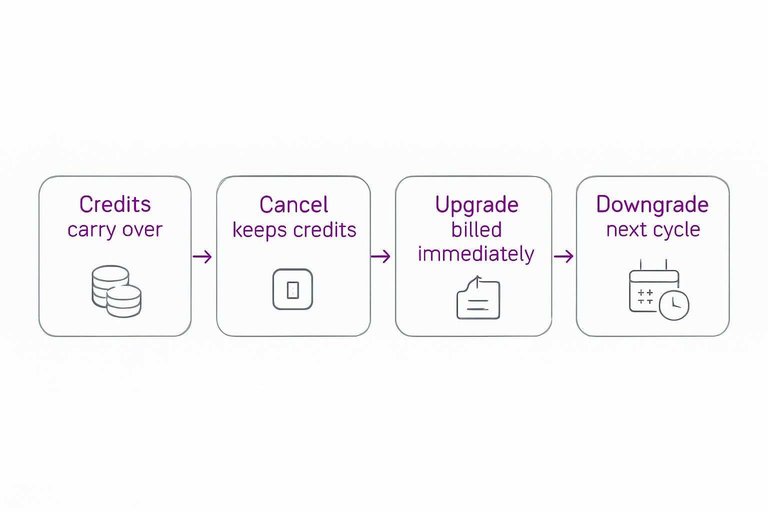
Credits don’t expire, and they carry over automatically. If you under-publish this month, those unused credits stay in your balance for later months instead of resetting at the billing boundary. That’s what makes “lumpy” client calendars workable without overbuying every month.
-
Canceling doesn’t zero out your balance. If you cancel a subscription, SEObot states you can still use your remaining credits afterward. Operationally, that means you can pause spend during onboarding churn, then burn down accumulated credits when a client finally approves topics.
-
Upgrades are charged immediately at the full new-plan price (no proration). SEObot’s Help Center frames this as a direct consequence of non-expiring credits. Translation for agencies: upgrading mid-cycle behaves more like buying an extra block of credits right now than “moving up a tier for the remainder of the month” (see billing when upgrading).
-
Downgrades wait until the next billing cycle. If you step down, the lower plan doesn’t apply mid-month; it starts at renewal. So if your volume drops, you don’t get instant bill relief the moment you click downgrade.
-
Support can do a manual proration adjustment—with a credit-balance correction. SEObot says support can manually calculate a prorated refund and adjust your credit balance accordingly. If you’re reconciling client bill-backs after a plan change, that manual adjustment is the mechanism that makes the math line up.
-
The $49 plan has the only published “try-and-refund” condition. The refund is limited to that entry plan and hinges on contacting them after the first article if you’re not satisfied. For agencies, that’s the cleanest low-risk way to validate output quality before you commit to larger credit buys—though it’s also worth comparing against platforms that offer a simple trial window (for example, Skribra’s 3-day free trial) so you can assess fit without having billing edge-cases drive the decision.
Because upgrades bill the full new-plan price immediately (instead of prorating), “we need more articles this week” can translate into an immediate invoice.
Agency volume strategies
Your two main levers are (1) buying a lot of credits under one account and allocating them across client sites, and (2) putting each client on a website-specific subscription (a subscription attached to a particular website in SEObot).
SEObot also publishes an agency packages concept—its agency price floor is $3.5/article when ordering 300+ articles—but the delivery model you sell clients changes depending on whether each site has its own subscription (and it helps to pair volume choices with fixing content bottlenecks with smart AI so production doesn’t outpace your team’s capacity).
| Decision axis | One pooled credit balance split across many client sites | Per-client website-specific subscriptions | Hybrid: subscriptions for “managed” clients + pooled credits for bursts |
|---|---|---|---|
| What you’re buying | Central volume pool | Subscription per site | Mix of both |
| Credit allocation | Allowed across sites | Naturally isolated | Controlled by your rules |
| What you lose on non-subscribed sites | No link updates; no new-page monitoring; no Search Console optimization | Nothing from that list | Only on the pooled-only sites |
| What you can sell cleanly | Content production | Content + ongoing optimization loop | Two-tier offer menu |
| Best fit | Many small, write-only retainers | Fewer clients, deeper SEO ownership | Agencies with mixed service levels |
| Integration access gotcha | Each site needs ≥1 credit to see “Connect my Blog → REST API / Next.js” | Each site already has credits via its plan | You control who gets that 1 credit |
| Backlink positioning | Backlink credit (a non-guaranteed bonus unit) isn’t a deliverable | Same constraint | Same constraint |
If your offer includes “we’ll keep posts updated and optimized using Google Search Console,” pooled credits alone don’t match what SEObot says it actually does per website without a subscription (see Using Article Credits Across Multiple Websites).
Workflow cost drivers
Hidden agency cost with SEObot is usually the operational “rules of the road” you have to enforce per client site—especially what must be edited inside SEObot versus what a client tries to tweak directly in their CMS.
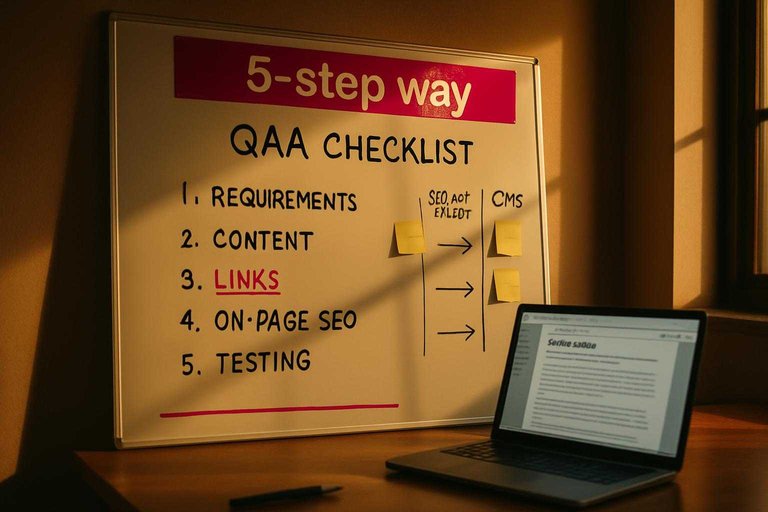
A 5-step way to model the labor per client per month
-
Lock down where edits happen. SEObot’s Help Center warns that if you edit the article content/headline/meta description (the search snippet text)/slug (the URL path)/main picture/status in your CMS (content management system), SEObot can override those changes; do those edits in the SEObot editor and leave only categories/tags/authors for the CMS (per how to edit an article). (This is a good place to sanity-check other tools too: if you’re considering something like Skribra—with WordPress publishing plus webhook-style integrations—still define a single “source of truth” for SEO fields so you don’t accidentally create the same overwrite/rework loop, and consider bookmarking resources to simplify SEO workflows.)
-
Turn that rule into a QA checklist. Every time a client insists on “just a quick tweak in WordPress,” you either enforce the editor-only workflow or you budget rework time when an overwrite happens.
-
Budget upfront internal-link setup time. If you’re selling internal linking, you still need to decide what pages are “link targets,” what pages are off-limits, and who approves link placements—then spend time reviewing early runs and iterating.
-
Do a security/integration intake before connecting anything. Before you use SEObot’s blog connection on a client site, decide who provides credentials/access, who approves the connection, and who owns ongoing maintenance of that integration. (If a platform also generates images automatically or publishes on a schedule, include brand/safety checks and rollback procedures in that intake, not just credentials.)
-
Screen offers that assume backlinks are a per-post deliverable. SEObot’s Help Center frames “backlink credits” as a bonus earned per new article—not a guaranteed backlink—so budget time for expectation-setting (or remove “links included” from the promise). The same expectation-setting applies to any backlink ecosystem (including Skribra’s backlink exchange network): position it as an optional authority lever with variability, not a fixed deliverable.
If you track time against these five steps for the first month, you’ll know whether the tool’s per-article cost is actually margin-positive at your client rate.
Setting client rates
Your client rate shouldn’t mirror your SEObot subscription math. Clients pay for a deliverable and a level of risk you’re taking off their plate (editing rules, QA, publishing, and accountability), not for the tool’s internal unit cost.
The cleanest way to defend pricing is to pick a deliverable tier first, then anchor it against what the market already pays for “one blog post.” WebFX publishes a $150 to $600 range per blog post for content marketing services, which is a useful “agency-managed” reference point. On the freelance side, the Editorial Freelancers Association rate chart lists 25.0¢–40.0¢ per word for blog posts—an anchor that maps to long-form work without pretending an AI tool price is the whole story. Meanwhile, the AI-era anchor is real too: Ahrefs reports 87% of AI users say their average cost of a single blog post is $0–$100. If your client has that number in their head, you either sell into it (drafts) or you explicitly sell above it (publish-ready + oversight).
Skribra value check
Where Skribra can be the better pick (so you can position SEObot honestly):
- Keyword discovery pulled from DataForSEO, feeding a rolling content calendar.
- IndexNow pings on publish, which is a concrete “post went live, now tell engines” workflow.
- Search Console-driven refreshes of existing posts (performance-based updating, not just net-new publishing).
- Webhook publishing for custom pipelines (useful when the CMS isn’t a standard integration).
- A backlink exchange network, if your offer includes participating in an ecosystem rather than treating links as a per-post deliverable.
Limits to keep in view when you scope it: the explicitly listed publishing destinations are WordPress, Shopify, Webflow, Notion, or a webhook, and the refresh loop implies Search Console access.
SEObot best-fit
SEObot is the better fit when you’re selling “autopilot research → publish” to busy founders or small teams, and you want strong approval controls around what goes live.
- If word count is part of your positioning, SEObot claims an average 3000 words per article and up to 4000 words.
- If you’re managing multiple client sites under one umbrella, treat the multi-site subscription tradeoff as a packaging decision: “content production” is easier to sell than “managed optimization,” because optimization features are tied to how each site is subscribed.
Rate worksheet
- Choose the deliverable tier you’re actually selling: AI drafts, publish-ready posts (edited and formatted), or managed content + optimization (you own ongoing updates).
- Pick the pricing anchor that matches that tier: $0–$100 (AI spend), $150–$600 (agency-managed per-post), or a per-word editorial anchor (25.0¢–40.0¢/word).
- Add your real labor: intake, topic approval, editing, images/formatting, and publishing QA.
- Add a risk buffer for rework you expect to eat (approval churn, overwrite mistakes, client edits outside your workflow).
- Set margin, then convert the result into a simple package (e.g., X posts/month) so clients buy outcomes, not line items.
Package outcomes, not credits
If you want a scalable, profitable offer, don’t let SEObot’s plan price become your “cost per post” — the non-expiring credit balance, immediate full-price upgrades, and per-website subscription features are what decide what you can truly deliver (and what can surprise-bill you mid-month). Pick your deliverable first: “content production” is the clean sell when you’re pooling credits, while “managed optimization” forces a per-site subscription model (or you’re promising link updates, monitoring, and Search Console optimization you don’t actually have on that site). If your agency’s value is a post-publish maintenance loop, Skribra is the tighter fit; if your value is autopilot research → publish with strong approval controls for busy teams, SEObot is the better match. The first move: choose which of those two offers you’re selling, then set one per-article price by adding your real labor + a rework buffer on top of your chosen market anchor—so your margin isn’t accidentally determined by credit mechanics.
Frequently Asked Questions
- Is SEObot’s “$3.5 per article for agencies ordering 300+” the same thing as the $1050/month (300 articles) subscription tier?
- No—one is a published per-article floor for agencies and the other is a published subscription tier with 300 article credits per month. SEObot doesn’t publish whether the 300+ agency threshold is monthly or a one-time order, so you can’t assume it maps 1:1 to the 300-articles/month plan.
- Does SEObot publish how agencies actually buy the 300+ per-article rate (self-serve checkout vs sales/chat)?
- No—SEObot publishes the $3.5/article floor but does not publish the purchase mechanism (checkout vs sales/chat), so agencies should confirm the ordering process before building a cost model around it.
- What exactly counts as one “article credit” in SEObot across different content types or refreshes?
- SEObot doesn’t publish a definition that clearly states what consumes one article credit across every feature or content type, or whether updates/maintenance consume credits. If you’re pricing client deliverables, you need that definition in writing before you lock a per-article margin.
- What’s included in the SEObot plan tier that lists “20 directory listings per month,” and who fulfills those listings?
- SEObot’s pricing ladder lists “20 directory listings/month” on the $499 tier, but it doesn’t publish the workflow details (what a listing is, how sites are chosen, turnaround/reporting, or whether it’s fulfilled by SEObot or a tool like ListingBott). Treat the line item as an allowance until you confirm the deliverable spec.
- Do I need a separate SEObot subscription per client site if I’m managing ongoing optimization, not just content generation?
- If your offer includes per-site optimization loops (like monitoring and iterating based on Google Search Console), don’t assume pooled credits behave the same as per-site subscriptions—SEObot distinguishes feature access by whether a site has its own subscription. If your priority is automated post-publish maintenance tied to Search Console plus publishing via WordPress/Shopify/Webflow/Notion or a webhook, Skribra is built around that workflow.
Sell Managed SEO Outcomes
Once you’ve set your offer and per-article rate, the next bottleneck is keeping rankings stable without adding a growing maintenance workload across client sites.
Skribra plans, writes, publishes, and maintains articles on the customer’s site using Search Console-driven updates, so your “managed optimization” promise stays consistent—backed by a 3-Day Free Trial.
Written by
Skribra
This article was crafted with AI-powered content generation. Skribra creates SEO-optimized articles that rank.
Share: