October 10, 2026
·
10 min read
Indexing Page in Google: Request Indexing vs XML Sitemaps
Indexing page not showing? Use Request indexing for one urgent URL, XML sitemaps for many, then verify the blocker in Search Console.

You just published or updated a page, and it still doesn’t show up when you search for it. The obvious next step is to look for an “index button” and keep clicking until something happens.
That guesswork costs time: launches slip, promo pages miss their window, and agencies burn hours explaining why a URL is “live” but not searchable. This comparison breaks down what “Request indexing” and XML sitemaps actually do, then gives you a decision matrix and a verification loop in Google Search Console to tell whether the bottleneck is discovery, crawling, or indexability.
Before you choose
Index page meaning
An “index page” is usually the site’s default entry page—the URL that loads at the root of your domain (for example, https://example.com/), often backed by a file named index.html or a CMS route that behaves like it. You find it by loading the root domain in a browser, following any redirects, and noting the final URL that renders as your homepage (then checking whether /index.html resolves to the same page on sites that expose it).
An “indexed page” is different: it’s a page Google has processed and decided to store (and potentially show) in its search index. If your problem is an indexing page not appearing in search, changing your homepage template or renaming index.html won’t fix it—you’re troubleshooting Google’s indexing decision, not your site’s default file.
Discovery vs indexing
Before you choose between Search Console’s “Request indexing” and an XML sitemap, separate three steps. URL discovery is how Google first learns a URL exists (commonly from links or an XML sitemap). Crawling is Googlebot fetching the page content to see what’s there. Indexing is Google processing what it crawled and deciding whether to store and potentially serve that URL from its index.
That’s why neither “Request indexing” nor sitemaps are an index button. Google says it doesn’t guarantee it will crawl, index, or serve a page—even if it follows Search Essentials. A sitemap can help Google discover URLs, but it doesn’t guarantee they’ll be crawled or indexed. In Search Console’s URL Inspection tool, “Request indexing” submits a URL to an indexing queue after a quick check, but it won’t run if the live test considers the page non-indexable—and Google still doesn’t guarantee the page will end up indexed. It can even fail silently if you’ve exceeded your request quota.
With that expectation set, the choice becomes about which step you’re trying to influence: discovery and crawl prioritization, not an instant “indexed” switch (see how Google Search works).
Request indexing reality
Search Console’s Request indexing (the URL Inspection action that asks Google to crawl one specific URL) is a fast way to put a single page in front of Google—but it’s not an “index now” button.
-
What it actually does: It submits that URL to an indexing/crawl queue. Google explicitly says a request doesn’t guarantee the page will appear in the index.
-
The eligibility gate (why the button sometimes isn’t a lever): Request indexing only makes sense after the URL passes the live test in URL Inspection. If that live check treats the page as non-indexable, you’re not “waiting on Google”—you’re blocked on whatever made the live result non-indexable, and repeated requests are wasted clicks.
-
Daily limits (the bottleneck agencies run into): Google puts a daily limit on how many requests you can submit. There isn’t a published number in the UI that you can plan around, so you should treat the button as a scarce resource for truly urgent URLs.
-
Silent quota failure (the nasty operational detail): When you’re over quota, request indexing can fail without a clear error. The practical consequence is simple: if you’re relying on request indexing as a routine publishing workflow, you can end up thinking you “queued” pages that never actually got submitted.
-
Timeline you should expect: Even when the request is accepted, Google says indexing can take a week or two. That’s why “I requested indexing this morning” is not a useful diagnostic by itself.
-
Best for vs. terrible for: Best for a single, high-priority URL (critical fix, corrected canonical, updated page you need recrawled). Terrible for many URLs at once—and Google’s own guidance is that for many pages you should submit a sitemap instead of trying to request them one by one.
If you’re trying to get an indexing page indexed and you’re clicking Request indexing repeatedly, the right next move is usually to confirm the live test is clean—or switch to a scalable discovery method—rather than keep “re-requesting” (per the URL Inspection tool documentation).
XML sitemap reality
An XML sitemap isn’t an “index this” button. It’s a structured list of URLs you want Google to know about (and keep re-checking) when you’re operating at scale.
-
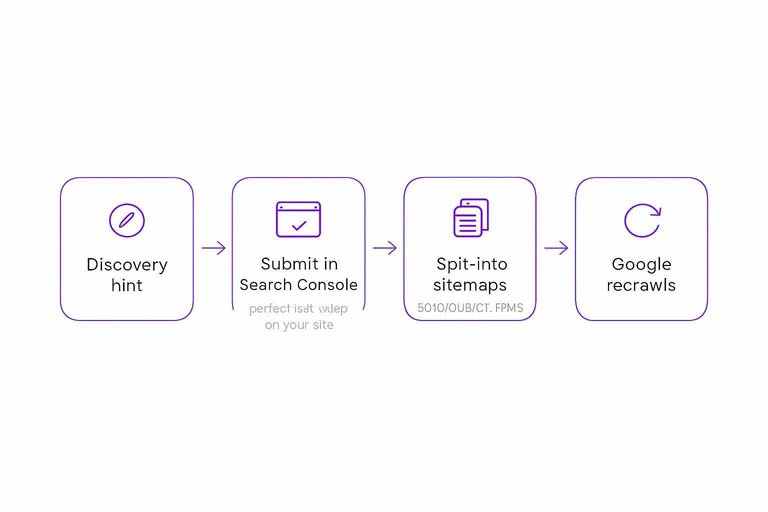
What a sitemap actually does: It’s a discovery and recrawl hint. You’re telling Google, “these URLs exist, and here’s the canonical list of what I consider important enough to submit.” That’s why sitemaps shine when you’re managing lots of URLs, not when you’re trying to push one urgent fix.
-
“Submitting” is not uploading: In the Search Console Sitemaps report, you don’t upload a file to Google. You submit by pointing Google to a sitemap file that lives on your site. Submitting through that report also requires owner permissions; without that, the alternative is referencing the sitemap location in robots.txt.
-
What Google ignores in your sitemap: Google explicitly says it ignores
and . If your sitemap workflow is built around tweaking those fields to “force” crawl behavior, that’s work Google has told you it won’t use. -
How to use
(and when not to) : Use, a sitemap timestamp meant to reflect the last significant modification of a URL, only when you can keep it consistently accurate. Google says it uses only if it’s reliably truthful (for example, verifiable against what changed on the page). If you stamp everything with “now,” you’ve thrown away the signal. -
Size limits you hit sooner than you think: One sitemap file is limited to 50MB uncompressed or 50,000 URLs. If you exceed either, split into multiple sitemaps and optionally tie them together with a sitemap index.
-
Recrawl cadence isn’t “every publish”: Once Google has successfully crawled a sitemap, it will periodically recrawl it on its own schedule. Resubmitting is optional (use it for major changes), not a required step for every new URL.
-
A practical UI constraint: The Search Console Sitemaps report shows up to 1,000 submitted sitemap entries. On large properties, that pushes you toward a clean sitemap index structure instead of endlessly submitting one-off sitemap URLs.
Sitemaps are best for keeping Google aware of a moving URL set. They’re terrible as a substitute for fixing why a specific page isn’t indexable (see Google’s Build and Submit a Sitemap guidance).
Decision matrix: request indexing vs XML sitemaps
Use this matrix when your goal is getting an indexing page (or any URL) in front of Google without wasting effort. First gate: if the URL Inspection live test doesn’t show the page as indexable, don’t submit anything yet. For broader context on how indexing, discovery, and submissions fit together, see this SEO guide for indexing.
| Urgency | Number of URLs | Site size / newness | Live test | Action |
|---|---|---|---|---|
| Low | One | Established site | Pass | Sitemap-only |
| Low | Many | Any size | Pass | Sitemap-only |
| High | One | Established site | Pass | Request-only |
| High | One | New or recently relaunched | Pass | Both |
| High | Many | Large, frequently changing | Pass | Sitemap-only |
| High | Many | New or small | Pass | Both |
| Any | Any | Any | Fail | Do neither yet |
Two clarifiers that save time:
- “Both” is for mixed reality: you need a scalable discovery path (sitemap) and you have a small set of truly urgent URLs worth spending requests on.
- If you’re trying to manage this at scale, don’t plan on manual clicking: the URL Inspection API is quota-limited to 2,000 queries per day per Search Console property (and 600 per minute), so use it for monitoring and spot-checking—not as a bulk substitute for submissions (per Google’s URL Inspection API limits).
Verification loop
Run this loop in Google Search Console every time an indexing page (or any URL) is “still not indexed.” It tells you whether you have a discovery problem, a crawl queue problem, an indexability problem, or a canonical problem.
-
Confirm the sitemap is fetchable (and actually the one you’re submitting). In Search Console → Sitemaps, your sitemap should show a successful read; if it errors, fix fetchability first (the sitemap URL must return a normal 200 response and not be blocked). If you’re generating a standard XML sitemap, keep it compliant with the sitemaps.org protocol so Google can parse it predictably.
-
Inspect the exact URL you care about (not “a similar page”). In URL Inspection, check the top-line verdict:
- “URL is on Google” = it’s indexed.
- “URL is not on Google” = it’s not indexed, and the details below tell you why.
-
Check whether Google knows the URL and how it found it. In the URL Inspection details, look for discovery signals (for example, whether the URL was seen via Sitemaps or another source). If it’s effectively unknown, adding it to the right sitemap and ensuring it’s linked internally is the correction—not more request clicks.
-
Read the indexing reason like a triage label. In Indexing → Pages (Page indexing report) and in URL Inspection, separate:
- Queued/priority states (for example, “Discovered – currently not indexed”).
- Fetched-but-not-kept states (for example, “Crawled – currently not indexed”).
- Explicit blocks (noindex, redirects, errors).
- Resolve canonical selection before you chase indexing. A canonical is the URL Google chooses to represent a cluster of similar/duplicate pages, and it isn’t always the one you declare. In URL Inspection, compare Google-selected canonical vs user-declared canonical (typically declared with rel=“canonical”); if Google picked a different URL, fix the duplication/canonical signals before you expect the inspected URL to index.
If your goal is to stop Google from indexing a page, make the page non-indexable (for example, with a noindex directive) and then use URL Inspection to confirm Google can crawl it and sees that directive—blocking crawling can prevent removal from ever being processed.

Checklist recommendation
Use this as the agency default when a client asks why an indexing page (or any URL) isn’t showing up.
- Gate first: Run the URL Inspection live test. If it fails, do neither yet—fix indexability/canonical signals before spending requests.
- One urgent URL (production fix, corrected canonical, critical update): Request indexing-only. Don’t keep clicking; even accepted requests can take a week or two to index.
- One urgent URL on a new/relaunched site: Both. Put it in your XML sitemap (with a truthful
) and request indexing. - Many URLs updated/published: Sitemap-only. Update the sitemap(s) and submit the sitemap URL, not each page.
- Operational habit: Treat request indexing as scarce—if you hit quota, you can think you submitted when you didn’t (see resources to simplify SEO workflows for helpful operational templates).
Stop Clicking, Start Diagnosing
There isn’t an “index button”—both Request indexing and XML sitemaps are ways to influence discovery and crawl priority, and neither guarantees a page will be indexed. The first move that isn’t wasted effort is to run the URL Inspection live test; if it doesn’t come back indexable (or canonicals don’t line up), don’t submit anything yet—fix that block. Once the page passes, treat Request indexing as a scarce, single-URL lever for truly urgent pages, and treat sitemaps as the scalable way to keep Google aware of many URLs. Then use the Search Console verification loop to pinpoint what’s actually stuck—unknown URL, crawl queue, indexing decision, or canonical choice—instead of guessing.
Frequently Asked Questions
- What is an index page in a website, and is it the same as an indexing page in Google?
- Not quite. An “index page” usually means a site’s default file or homepage (like index.html), while an “indexing page” in SEO means a URL you want Google to add to its search index.
- How do I check if an indexing page is actually indexed in Google?
- Use Google Search Console’s URL Inspection tool and check the top verdict: “URL is on Google” means indexed, and “URL is not on Google” means it isn’t. Don’t rely on a site: query alone, because it can miss indexed URLs or show stale results.
- How do I stop Google from indexing a page without removing it from my site?
- Make the page indexable for crawling but explicitly non-indexable by adding a noindex directive, then verify in URL Inspection that Google can crawl the page and sees the noindex. Don’t block crawling if your goal is deindexing, because Google needs to fetch the page to process the noindex.
- Should I update the
date in my XML sitemap every time I publish or edit an indexing page? - Update
only when the page had a significant change and you can keep the timestamp consistently accurate. If you stamp every URL with “now,” you erase the signal and make unreliable. - I used Request Indexing—how long should I wait before assuming my indexing page won’t be indexed?
- Google says indexing after a Request Indexing submission can take a week or two. If the URL Inspection live test shows the page is non-indexable, fix that first instead of waiting or re-requesting.
Keep New URLs Discoverable
Once your indexability checks are clean, the next bottleneck is consistent publishing, clean internal linking, and getting Google to notice each new URL reliably.
Skribra plans, writes, publishes, and maintains SEO articles on your site, triggering IndexNow when posts go live so new pages get discovered faster—plus a 3-Day Free Trial to validate the workflow.
Written by
Skribra
This article was crafted with AI-powered content generation. Skribra creates SEO-optimized articles that rank.
Share: