October 8, 2026
·
12 min read
What Is Technical SEO and How Does It Work?
This explainer demystifies what technical SEO is and how it actually works—crawl vs render vs index vs serve, the URL lifecycle pipeline, robots.txt vs noindex, canonicalization (rel="canonical"), common failure patterns, and a minimal diagnostic workflow—so problems get traced to the right stage before anything gets “fixed.”

You publish a page, update a title, or remove an old product—and the search results don’t change the way you expect. Sometimes the page never shows up, sometimes the wrong URL ranks, and sometimes what you see in a browser doesn’t match what search engines seem to understand.
When that happens, guessing is expensive: you burn hours in audits, ship risky changes, and still can’t explain the outcome to a client or stakeholder. This guide gives you a clear model of technical SEO as a URL pipeline (crawl → render → index → serve), plus the failure patterns and a minimal workflow to pinpoint what’s actually breaking.
Technical SEO defined
Technical SEO is the part of SEO that controls whether search engines can reach your pages and reliably process them—separate from what you say on the page (content) and who points to you (links). It’s the “plumbing” that determines what a bot can discover, fetch, render into usable HTML, store as the representative version in its index, and ultimately show in search features.
What it controls
Google doesn’t have a master list of the web, so it has to keep discovering and revisiting URLs. When it fetches a page, it can also render it and run JavaScript using a recent version of Chrome—so technical choices that hide navigation or content until scripts run are part of seo technical work.
This layer includes:
- Discovery inputs: whether URLs are findable through internal links and files like an XML sitemap.
- Fetch access: whether Googlebot is allowed to request a URL and its resources (for example via robots.txt).
- Renderability: whether critical content and links exist once the page is rendered, not just in raw source.
- Index eligibility and “which URL wins”: Google may cluster duplicates and still choose a different preferred URL than the one you indicate with rel=“canonical”.
- Result presentation constraints: whether the page is eligible for specific appearances (and whether those are actually shown).
Why checklists fail
The same “fix” can succeed or fail depending on where the pipeline is broken. Blocking a URL in robots.txt doesn’t guarantee it stays out of results—Google may still find and index it if it’s linked elsewhere. And if you block crawling, Google won’t see on-page rules like meta robots or the X-Robots-Tag header, so those directives can be ignored. That’s why technical SEO is diagnosis first, settings second.
URL lifecycle pipeline
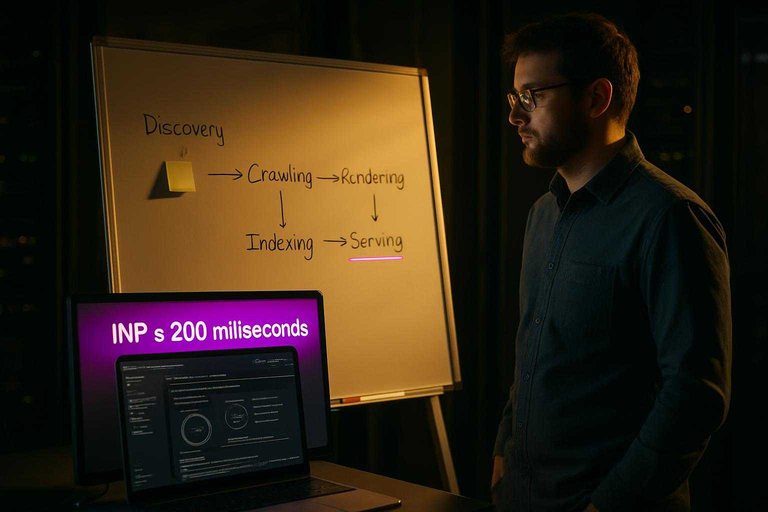
A single URL doesn’t “rank” the moment you publish it. It moves through a pipeline, and the symptom you see depends on which stage is failing.
-
Discovery (how Google learns the URL exists)
Google has no central registry of all web pages, so it has to continuously discover new and updated URLs. One of the cleanest discovery inputs you control is an XML sitemap—just note the hard ceilings: one sitemap file is limited to 50,000 URLs or 50MB uncompressed, it must be UTF-8, and bigger sites need multiple sitemaps plus (optionally) a sitemap index. -
Crawling (when a search engine fetches a URL—and often follows links it finds—to discover new or updated pages)
At this stage, Googlebot requests the URL and tries to fetch the resources it needs. Your first “gate” is robots.txt; Google enforces a 500 KiB robots.txt size limit, so anything beyond that limit won’t be processed. -
Rendering (when the crawler executes page resources—especially JavaScript—to produce the rendered HTML it can evaluate for content/links)
Google can render pages and run JavaScript using a recent version of Chrome via its Web Rendering Service (WRS). What matters here is what exists after rendering: the rendered HTML is what Google can evaluate for main content, internal links, and other signals that weren’t present in raw source. -
Indexing + canonicalize (Indexing is when the search engine stores processed information about a page so it’s eligible to appear in results; Canonicalization is how search engines cluster similar/duplicate URLs and pick the representative URL to show)
Two common “why isn’t it showing?” levers live here:
- noindex only works if the page is crawlable—if you block crawling, Google can’t reliably see the directive.
- Canonicalization is a clustering decision, not a single tag. Google uses multiple signals (including redirects, sitemap inclusion, and rel=“canonical”) and can choose a different canonical than the one you specify.
- Serving (what Google is willing to show, and how it evaluates the experience)
Google primarily uses the mobile version of content (as seen by smartphone Googlebot) for indexing and ranking—this is mobile-first indexing. It also evaluates page experience signals such as Core Web Vitals (standard UX metrics): “good” thresholds are LCP within 2.5 seconds, INP ≤ 200 milliseconds (INP replaced FID in March 2024), and CLS ≤ 0.1—and field assessments should be judged at the 75th percentile. If your server is overloaded, Google recommends returning 503 or 429 temporarily; Googlebot will retry for about 2 days.
Once you can point a symptom at one step—discovery, crawl, render, index/canonicalize, or serve—you stop guessing and start fixing the right system.
A single URL doesn’t “rank” the moment you publish it. It moves through a pipeline, and the symptom you see depends on which stage is failing.
-
Discovery (how Google learns the URL exists)
Google has no central registry of all web pages, so it has to continuously discover new and updated URLs. One of the cleanest discovery inputs you control is an XML sitemap—just note the hard ceilings: one sitemap file is limited to 50,000 URLs or 50MB uncompressed, it must be UTF-8, and bigger sites need multiple sitemaps plus (optionally) a sitemap index. (See Google’s guidance on build and submit a sitemap for the exact limits and requirements.) -
Crawling (when a search engine fetches a URL—and often follows links it finds—to discover new or updated pages)
At this stage, Googlebot requests the URL and tries to fetch the resources it needs. Your first “gate” is robots.txt; Google enforces a 500 KiB robots.txt size limit, so anything beyond that limit won’t be processed. -
Rendering (when the crawler executes page resources—especially JavaScript—to produce the rendered HTML it can evaluate for content/links)
Google can render pages and run JavaScript using a recent version of Chrome via its Web Rendering Service (WRS). What matters here is what exists after rendering: the rendered HTML is what Google can evaluate for main content, internal links, and other signals that weren’t present in raw source. -
Indexing + canonicalize (Indexing is when the search engine stores processed information about a page so it’s eligible to appear in results; Canonicalization is how search engines cluster similar/duplicate URLs and pick the representative URL to show)
Two common “why isn’t it showing?” levers live here:
- noindex only works if the page is crawlable—if you block crawling, Google can’t reliably see the directive.
- Canonicalization is a clustering decision, not a single tag. Google uses multiple signals (including redirects, sitemap inclusion, and rel=“canonical”) and can choose a different canonical than the one you specify.
- Serving (what Google is willing to show, and how it evaluates the experience)
Google primarily uses the mobile version of content (as seen by smartphone Googlebot) for indexing and ranking—this is mobile-first indexing. It also evaluates page experience signals such as Core Web Vitals (standard UX metrics): “good” thresholds are LCP within 2.5 seconds, INP ≤ 200 milliseconds (INP replaced FID in March 2024), and CLS ≤ 0.1—and field assessments should be judged at the 75th percentile. If your server is overloaded, Google recommends returning 503 or 429 temporarily; Googlebot will retry for about 2 days.
Once you can point a symptom at one step—discovery, crawl, render, index/canonicalize, or serve—you stop guessing and start fixing the right system.
Common failure patterns
When seo technical work goes wrong, the symptom you see is usually downstream from the real break. Use these cause→effect patterns to jump to the pipeline stage and test a hypothesis instead of toggling settings.
-
Robots/noindex trap (crawl vs index eligibility)
Symptom: a URL is “blocked” but still shows up in results, or a noindex rule doesn’t stick.
Cause: robots.txt (a public file that gives crawl instructions; it can block fetching, but it is not a reliable “do not index” control by itself) can prevent Google from fetching the page, which means it may never see your noindex (a meta tag or HTTP header directive telling supporting engines not to index—only works if the crawler can access the page to see it). If you need a server-level rule, use X-Robots-Tag (an HTTP response header that applies rules like noindex to files or whole paths).
Test: in Google Search Console, use the URL Inspection tool to see whether Google could fetch the page and which indexing directives it detected. -
JavaScript rendering gap (render stage)
Symptom: users see content/links, but Google behaves like they’re missing.
Cause: critical navigation or main content only exists after JavaScript runs.
Test: in URL Inspection, compare what Google “sees” after rendering versus your raw HTML. -
Canonical surprises (canonicalize stage)
Symptom: the indexed URL isn’t the one you set as canonical (“Google-selected canonical” differs).
Cause: canonicalization is a clustering decision using multiple signals; rel=“canonical” isn’t a guaranteed directive.
Test: URL Inspection → check both your declared canonical and Google’s selected canonical, then audit conflicting signals (internal links, redirects, sitemap entries). -
Sitemap/robots constraints (discovery + crawl stage)
Symptom: “Submitted sitemap” but important URLs never get picked up.
Cause: sitemap coverage doesn’t match what you actually want indexed, or crawl rules block key sections/resources.
Test: validate your sitemap file against the sitemaps.org protocol, then spot-check a few URLs in Search Console. -
Soft 404s (indexing stage)
Symptom: pages return 200 OK but don’t index, or get flagged as errors.
Cause: a Soft 404 (a page that returns a 200 response but looks like “not found” to Google’s algorithms).
Test: inspect affected URLs and verify the page serves real content or returns a true 404/410. -
Overload responses (serving stage)
Symptom: crawling drops during traffic spikes or deploys; errors cluster in logs.
Cause: the server starts refusing requests. A temporary HTTP 503/429 is a clearer signal than timing out, and you can pair it with a Retry-After header to tell crawlers when to come back.
Minimal diagnostic workflow
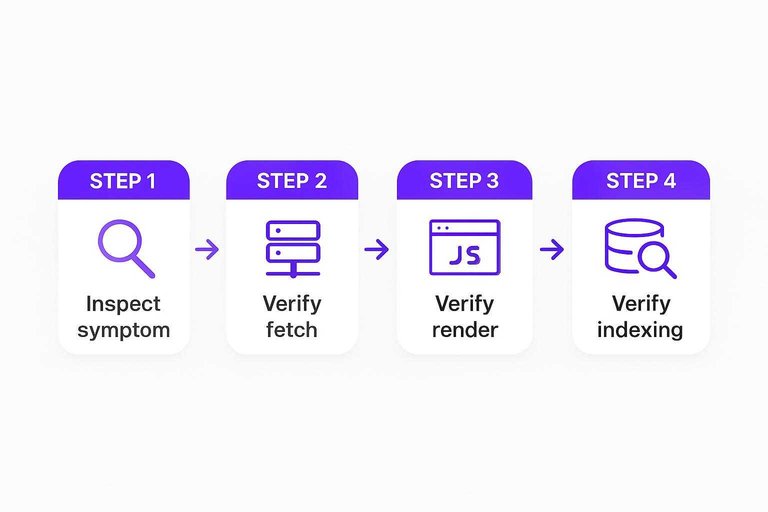
Pick one representative URL and run the same sequence every time. The goal in seo technical work is to identify the failing stage before you touch settings. For a broader framework you can reference alongside this checklist, see our SEO guide for beginners.
-
Inspect the symptom (don’t assume the cause)
Write down what’s wrong in one line: “not discoverable,” “fetch fails,” “content missing,” “wrong URL showing,” or “indexed but underperforming.” If you can’t name the symptom, you’ll chase ghosts. -
Verify fetch (can the bot get the bytes?)
Check the HTTP response (status, redirects, headers) and whether your rules block access. If the URL or critical resources can’t be fetched, nothing after this step matters. -
Verify render (what does Google see after JS runs?)
Use Rich Results Test to view the rendered HTML Google’s tooling produces. Confirm that your main content and internal links exist post-render, not just in raw source. -
Verify indexing + canonical signals (is it eligible, and is the right URL winning?)
Confirm there’s no indexing directive preventing storage, then check canonical signals and duplication. If you run international pages, validate hreflang annotations alongside canonicals. -
Only then look at serving signals
If the page is already getting indexed, switch to experience and presentation: use the Chrome UX Report (CrUX) to sanity-check real-user performance data. And don’t start by “optimizing crawl budget”—Google’s guidance is that most sites don’t need to.
Limits and monitoring
Technical SEO can remove friction, not create demand. You can make a page crawlable, renderable, and index-eligible, but you can’t make an irrelevant page rank for a query it doesn’t satisfy. It also can’t force SERP features: even correct structured data isn’t guaranteed to show as a rich result, and a structured-data manual action can remove rich-result eligibility without changing how the page ranks in core web results.
The work is maintenance, not a one-time “fix.” Monitor for changes that reopen old problems: indexing/canonical shifts, accidental blocks, template changes that alter internal links, and server incidents that change responses. When the fix involves code, builds, caching, headers, or infrastructure, escalate to your development/operations teams (the people who ship code and run servers); when it’s about intent, messaging, or coverage, it’s on content.
AI hasn’t killed SEO—it speeds up research and production—but the crawl → render → index → serve mechanics still decide what’s eligible. Tools like Skribra can operationalize publishing and post-publish upkeep (including IndexNow pings, which still don’t guarantee indexing) while you keep the technical pipeline healthy—pair it with resources to simplify SEO workflows to keep monitoring and maintenance lightweight. If you implement IndexNow yourself, it uses an API key file named exactly as your key plus .txt (keys are 8–128 characters), and a submission is only a notification—each participating search engine still decides whether to index.
Technical SEO can remove friction, not create demand. You can make a page crawlable, renderable, and index-eligible, but you can’t make an irrelevant page rank for a query it doesn’t satisfy. It also can’t force SERP features: even correct structured data isn’t guaranteed to show as a rich result, and a structured-data manual action can remove rich-result eligibility without changing how the page ranks in core web results.
The work is maintenance, not a one-time “fix.” Monitor for changes that reopen old problems: indexing/canonical shifts, accidental blocks, template changes that alter internal links, and server incidents that change responses. When the fix involves code, builds, caching, headers, or infrastructure, escalate to your development/operations teams (the people who ship code and run servers); when it’s about intent, messaging, or coverage, it’s on content.
AI hasn’t killed SEO—it speeds up research and production—but the crawl → render → index → serve mechanics still decide what’s eligible. Tools like Skribra can operationalize publishing and post-publish upkeep (including IndexNow pings, which still don’t guarantee indexing) while you keep the technical pipeline healthy—pair it with resources to simplify SEO workflows to keep monitoring and maintenance lightweight. If you implement IndexNow yourself, it uses an API key file named exactly as your key plus .txt (keys are 8–128 characters), and a submission is only a notification—each participating search engine still decides whether to index.
Diagnose the pipeline, then fix
When search results don’t move the way you expect, the fastest path isn’t another technical SEO checklist—it’s figuring out which part of the crawl → render → index → serve pipeline is actually failing for a specific URL. Pick one representative page and verify fetch, rendered output, indexing/canonical signals, and only then serving signals, so you’re changing the system that’s broken instead of toggling settings blindly. Technical SEO won’t manufacture demand for an irrelevant page, but it will remove the hidden blockers that keep the right page from being understood and chosen. Treat it as ongoing maintenance: monitor for accidental blocks, template changes, canonical shifts, and server incidents—and escalate the fixes that require code, headers, caching, or infrastructure to the teams who control them.
Frequently Asked Questions
- Do I need to worry about crawl budget in seo technical for a small business site?
- No—Google’s own guidance says crawl budget isn’t something most sites need to optimize. Focus on removing crawl traps (endless URL parameters, duplicate paths, broken internal links) only when you see crawl waste or indexing gaps in Search Console and logs.
- Is rel="canonical" a directive, or can Google ignore it in technical SEO?
- It’s a strong hint, not a guarantee—Google can select a different canonical when other signals conflict. Align your canonicals with redirects, internal links, and sitemap URLs so you’re not telling Google three different “preferred” versions.
- How do I measure Core Web Vitals correctly for seo technical audits?
- Use field data and judge pass/fail at the 75th percentile, not a single lab run. Track LCP, INP, and CLS in sources like Chrome UX Report and Google Search Console so you’re measuring what users actually experience.
- If my server is overloaded, what status code should I return so Googlebot comes back?
- Return 503 or 429 during the incident and include a Retry-After header to signal when to retry. Googlebot will retry for about 2 days after receiving 503/429, so use that window to stabilize the site.
- Can Skribra help maintain seo technical health after an article is published?
- Yes—Skribra can monitor Google Search Console performance and update existing posts (like titles and internal links) when pages start slipping. It can also trigger IndexNow on publish as a notification step, while you still validate crawl/render/indexing in Search Console for true technical issues.
Keep Rankings From Slipping
Once the crawl→render→index path is stable, the next challenge is shipping the right pages consistently—and keeping them current as SERPs, templates, and facts change.
Skribra is an AI-driven SEO content system that plans, writes, publishes, and maintains articles on your site using Search Console data to refresh titles, facts, and internal links—plus a 3-Day Free Trial.
Written by
Skribra
This article was crafted with AI-powered content generation. Skribra creates SEO-optimized articles that rank.
Share: