August 19, 2026
·
8 min read
11 Enterprise SEO Mistakes That Waste Crawl Budget
An enterprise SEO troubleshooter for diagnosing and fixing crawl budget waste — confirm the signals with the right logs and reports, avoid robots/noindex traps, correct canonical and redirect failures, and control infinite faceted URLs before they drain discovery and recrawling.

If Google keeps crawling “junk” URLs while your important pages update slowly, you don’t have a content problem—you have a crawl budget problem. And on large sites, a few technical missteps can quietly multiply into millions of wasted requests.
This troubleshooter helps you prove crawl waste quickly, pinpoint the most common enterprise causes, and choose fixes that actually change crawler behavior. You’ll learn what to check first, how to validate repairs, and how to prevent the same patterns from coming back.
Confirm Crawl Budget Waste
Crawl budget waste is when Googlebot spends requests on URLs that cannot rank or should not exist. You need proof before you change templates, rules, or navigation.
Wasted crawl signals
You’re looking for patterns where crawling increases but your useful pages do not. Catch these early, and you avoid weeks of blind fixes.
- Crawl spikes without index growth
- Many non-200 hits in logs
- Parameters dominate crawl requests
- New pages discovered very slowly
If two or more show up together, you’re not “low on crawl budget.” You’re leaking it.
Pull the right data
You can’t diagnose crawl waste from one dashboard. Pull sources that show both bot behavior and indexing outcomes.
- Server logs with Googlebot hits
- GSC Crawl stats trends
- Index coverage and exclusions
- XML sitemap submitted vs indexed
- Canonical reports and patterns
If your data can’t connect “crawled URL” to “indexed outcome,” you’re guessing.
Triage in 20 minutes
Run the quickest checks first, in the order that reveals hard blockers. You want answers fast, not perfect.
- Check robots.txt for blocked sections and accidental wildcards.
- Spot-check noindex on templates, not just a few URLs.
- Validate canonical tags match your preferred URL format (use this SEO guide if you need a refresher).
- Sample redirect chains and loops from top crawled URLs.
- Compare sitemap URLs to crawl logs for parameter and facet drift.
Your first goal is to find the one rule that creates thousands of bad URLs.
Define success criteria
“Fixed” depends on what your site sells, how fast it changes, and which pages matter. Define it in outcomes you can measure in logs and Search Console, not in implementation tasks.
Look for fewer crawls on non-canonical and low-value URLs, plus faster recrawls on your money pages. You also want stable indexing and consistent canonical selection across templates.
Robots Blocking Essentials
Robots.txt is a blunt tool. In enterprise setups, one broad rule can block templates, CSS/JS, or rendering files your pages need to be understood.
- Export your current robots.txt and list every Disallow and Allow.
- Map each rule to real URL patterns, including parameters and subfolders.
- Test critical templates and resources with a robots tester and a real fetch.
- Verify CSS/JS, JSON, fonts, and image assets return 200 and are crawlable.
- Ship the smallest rule change, then monitor crawl stats and render coverage.
If Google can’t fetch what your page needs to render, indexing becomes guesswork.
Noindex-Crawl Trap
You’re telling Google “don’t index this,” but still inviting it to crawl. That burns crawl budget on URLs that can never pay you back.
Common causes
This trap usually comes from “temporary” decisions that quietly become permanent. The giveaway is heavy internal linking to pages you’ve marked noindex.
- Legacy noindex rules left in place
- Environment toggles flipped wrong at launch
- Template defaults adding noindex sitewide
- Tag pages noindexed but linked everywhere
If navigation keeps pointing at noindex, you’ve built a crawl treadmill.
Find them fast
You want three angles: what Google reports, what Google actually crawls, and what your site links to. When all three agree, you have your hit list.
- In GSC, export pages excluded by “noindex.”
- Pull log entries for those URLs and count repeat hits.
- Run an internal link report to noindex destinations.
- Sort by “most linked” and “most crawled” first.
Prioritize the URLs that are both popular internally and frequently requested by bots.
Choose a resolution
Pick the fix based on intent, not habit. The goal is to make crawling and indexing expectations match.
If the page should rank, remove noindex and improve content quality. If it should not exist, deprecate it and remove internal links. If it’s thin but useful in aggregate, consolidate into a stronger hub and redirect. If it’s necessary but not for search, block crawling with robots rules or tighter routing.
Align the decision with what your navigation and templates promise Google.

Prevent recurrence
You’re fighting process, not just pages. Put guardrails where noindex gets introduced.
- Add deployment checks for robots directives
- Audit templates for default meta robots
- Test key routes for X-Robots-Tag headers
- Fail builds on accidental noindex patterns
Make noindex an explicit choice, not an accidental side effect.
Canonicalization Gone Wrong
Canonical tags are supposed to collapse duplicates into one preferred URL. When they conflict, bots keep revisiting near-identical pages and your crawl budget leaks away.
Imagine a product page where internal links point to one URL, but the canonical points to another. Google keeps testing both, because your site can’t decide.
Mismatch symptoms
Canonical problems show up as small inconsistencies that compound into big duplication. Watch for these signals across GSC, logs, and index coverage.
- Google selects a different canonical
- Duplicate clusters keep growing
- Parameter URLs get indexed
- Canonicals vary by protocol or host
- Internal links contradict canonicals
If you see two “preferred” versions in play, Google will keep paying both tabs.
Root cause patterns
Most canonical chaos comes from templating drift and URL rules that aren’t enforced everywhere. Fixing the source pattern matters more than fixing one page.
Relative canonicals can resolve differently across hosts or protocols. Mixed trailing slashes and pagination canonicals often create accidental chains or cross-canonicals. Localization bugs are common too, where a market page points to the wrong country version.
Canonicalization isn’t a tag problem. It’s a URL governance problem.
Repair checklist
Make one URL format the rule, then make every signal agree with it.
- Standardize one URL format for host, protocol, slash, and params.
- Set self-referential canonicals on every indexable page.
- Align sitemaps and internal links to the canonical URLs.
- Verify HTTP headers match the HTML canonical tags.
When every system points the same way, crawlers stop “double-checking” your intent.
Validate changes
You’re done when Google stops arguing with you. Look for stabilization in canonical selection and fewer duplicate pathways.
In GSC, the chosen canonical should match your declared canonical more consistently. In server logs, crawling should concentrate on preferred URLs instead of bouncing between variants. Over time, duplicate exclusions should shrink as old alternates fall out of consideration.
Your goal isn’t fewer pages crawled. It’s fewer useless pages crawled.
Redirect Chains Everywhere
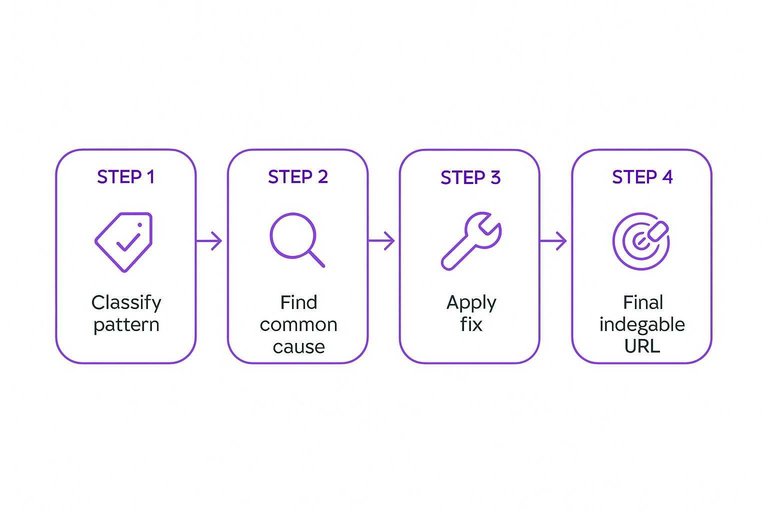
Redirect chains and loops quietly drain crawl requests and slow down discovery. You want bots to hit the final, indexable URL in one hop.
A quick way to spot waste is to classify what you’re seeing and what to fix—use this ultimate SEO content checklist to streamline your pages as you clean up redirects.
| Pattern | Why it wastes crawl | Common cause | Fix |
|---|---|---|---|
| 301 → 301 → 200 | Extra hops | Legacy URL migrations | Update links to final |
| 302 → 200 | Recrawled uncertainty | Temporary redirect left | Switch to 301 |
| HTTP → HTTPS → 200 | Double hop | Mixed protocol linking | Link to HTTPS |
| /a → /b → /a | Infinite loop | Conflicting rules | Remove one rule |
| 200 → 301 → 200 | Split signals | App rewrite mismatch | Normalize routing |
One clean redirect is a tool; three is a tax.
Infinite Facet Combinations
Faceted navigation can generate near-infinite URLs that look unique to crawlers. Most of them add zero indexable value, yet they soak up crawl budget and dilute internal signals.
Imagine a category page where color, size, brand, sort order, and tracking parameters all stack. You just created thousands of crawlable states without creating thousands of useful pages.
Facet explosion triggers
Facet bloat usually starts as a UX win and turns into a crawl trap. You need to spot the URL patterns that multiply with every click.
- Multi-select filters that stack parameters
- Sort orders that create unique URLs
- Tracking parameters on internal links
- Session IDs or user-state tokens
- Links to every facet state
If you can create new URLs without creating new demand, you have a crawl-budget leak.
Control methods
You want some facet pages to rank, not all of them. The job is choosing which combinations deserve crawling and indexing.
Selective indexable facets beat blanket rules. Use parameter handling where supported, robots rules for clear junk patterns, and canonicals for consolidating close variants.
If a facet state should not exist as a page, stop linking to it like one.
Implementation steps
Treat this like an information architecture project, not a quick robots.txt patch.
- Inventory all facets, parameters, and URL formats.
- Classify intent by query value and merch priority.
- Whitelist indexable facet combinations and templates.
- Block, noindex, or disable everything else at the source.
- Update internal linking and regenerate sitemaps.
Fix generation first, then cleanup becomes predictable.
Quality guardrails
Any facet page you keep indexable must earn its spot. Otherwise, you just curated a smaller set of thin pages.
Give indexable facet pages unique content where it matters, stable titles that don’t churn, and curated internal links that reflect real importance.
If you won’t link to it on purpose, Google shouldn’t find it by accident.
Run the 24‑Hour Crawl Budget Triage
- Prove waste before you fix: Pull Googlebot hits from logs (or CDN/WAF), then split requests into 200 indexable, redirects, 4xx/5xx, parameter/facet URLs, and blocked/noindex.
- Kill the biggest sinks first: Prioritize issues that create lots of URLs (facets/params), then remove crawler traps (robots mistakes, noindex-with-crawl), then clean up canonicals and redirect chains.
- Ship one change and validate: After each fix, verify with logs + Search Console crawl stats that Googlebot shifts toward canonical 200s and away from traps.
- Lock it in: Add guardrails (robots rules, parameter handling, internal-link hygiene, redirect standards, facet limits) and define a monthly check so waste doesn’t reappear.
Frequently Asked Questions
- Does crawl budget still matter for enterprise SEO in 2026?
- Yes—crawl budget still matters on large sites where important URLs compete with low-value ones for Googlebot attention. It’s most noticeable when new or updated pages take too long to be discovered, rendered, or reprocessed.
- How do I monitor crawl budget and crawl waste on an enterprise site?
- Use Google Search Console Crawl Stats for Googlebot trends, and combine it with server log analysis to see exactly which URLs bots hit, how often, and what status codes they get. Pair that with an XML sitemap audit to confirm bots are spending time on your indexable, prioritized URLs.
- What is the difference between crawl budget and indexation problems in enterprise SEO?
- Crawl budget is about how often bots fetch URLs; indexation is whether those URLs are eligible and chosen to appear in the index. You can have heavy crawling with poor indexation if pages are low quality, duplicate, or send mixed signals via internal linking and templates.
- Should enterprise SEO teams block internal search and parameter URLs with robots.txt or handle them another way?
- For internal search results, block them with robots.txt and remove them from sitemaps to avoid bot traps. For parameter URLs, prefer controlling them via URL design, internal linking rules, and canonical/hreflang consistency, using robots.txt only when you’re sure you won’t need Google to crawl them for discovery.
- How often should you audit technical SEO for crawl budget on an enterprise website?
- Most enterprise teams review crawl behavior continuously via Search Console and log dashboards, then run deeper technical audits after major releases, migrations, or template changes. Regular audits catch crawl traps early before they scale across millions of URLs.
Protect Crawl Budget at Scale
Fixing crawl budget waste means tightening technical SEO while keeping a steady flow of fresh, index-worthy pages across a sprawling site.
Skribra publishes daily SEO-optimized articles with clean formatting and WordPress integration, so your content supports crawl efficiency—start with the 3-Day Free Trial.
Written by
Skribra
This article was crafted with AI-powered content generation. Skribra creates SEO-optimized articles that rank.
Share: