September 8, 2026
·
Updated October 28, 2026
·
17 min read
Autoblogging and SEO: 9 Mistakes That Cause Thin Content
A guide to autoblogging and SEO: what Google's spam and helpful-content policies say about automated publishing, the nine pipeline mistakes that produce thin content, a Search Console fix order, and the limits of even a careful setup. Policy details were checked against Google Search Central in October 2026.


Short answer: autoblogging isn't against Google's rules, but many autoblogs end up breaking them. Google doesn't care whether a person, a plugin or an AI wrote a page. Its scaled content abuse policy targets something else: lots of pages made mainly to rank, with little value for readers, "no matter how it's created."
So the real question is what your pipeline publishes. This guide covers what Google's policies actually prohibit, the nine autoblogging mistakes that cause thin content, how to tell from Search Console which one you're dealing with, and the order to fix them in. It also covers the limits that remain even with a careful setup. Skribra, which publishes this blog, is an automated SEO content platform, so product claims are kept to one clearly labeled section.
Is autoblogging bad for SEO? What Google actually says
Autoblogging means software publishes posts to your site on a schedule, from feeds, templates or AI drafts, with little or no editing per post. Google has no rule against that. Its guidance on AI-generated content points out that automation has long produced useful pages, such as sports scores, weather forecasts and transcripts. Automation, AI included, only becomes spam when its main purpose is to manipulate rankings. We cover whether Google penalizes AI content in general in a separate guide.
What Google does prohibit is a pattern. Its spam policies define scaled content abuse as generating many pages mainly to manipulate search rankings rather than help users. The policy applies however the content is made: by automation, by people, or both. Its examples read like a description of a careless autoblog: generative AI pages that add no value, scraped feeds run through synonym swaps or translation, content stitched together from other pages, and pages that make little sense to a reader but contain the right keywords.
Other spam policies catch the usual autoblog shortcuts too:
| Google policy | What it covers (paraphrased) | The autoblog version |
|---|---|---|
| Scaled content abuse | Many pages made mainly to rank, with little value, however they’re produced | A keyword list goes in, hundreds of near-identical posts come out |
| Scraping | Republishing other sites’ content, sometimes lightly modified, without adding value | RSS items or competitor posts rewritten by a spinner or an LLM |
| Doorway abuse | Many similar pages for similar searches that funnel users somewhere else | “[Service] in [City]” pages that differ only by the city |
| Thin affiliation | Affiliate pages that copy merchant descriptions and reviews with nothing added | Product feeds turned into “reviews” |
| Site reputation policy | Third-party pages hosted mainly to borrow the host site’s ranking signals | Partner or white-label posts placed on a strong domain |
| Expired domain abuse | Buying an expired domain to host low-value content on its old reputation | An autoblog launched on a dropped domain from another niche |
Spam policies aren’t the only filter. Google’s ranking systems also judge whether content is helpful. The helpful content system became part of Google’s core ranking systems in March 2024, according to its ranking systems guide. Google’s helpful content guidance lists warning signs that fit autoblogging closely: producing lots of content on many different topics in the hope that some of it performs, using extensive automation to produce content on many topics, and mainly summarizing what others say without adding much value.
The policies have teeth. Google says that once the March 2024 core update and the new spam policies had rolled out, search results showed 45% less low-quality, unoriginal content.
Manual action or algorithmic demotion?
Thin content can hurt a site in two ways, and each needs a different fix.
- Manual action. A Google reviewer decides your pages break a spam policy. You get a notice in the Manual actions report in Search Console, listing the affected URL patterns, which can be one directory or the whole site. The “Thin content with little or no added value” action names thin affiliate pages, scraped content, low-quality guest posts and doorways as typical causes. It’s lifted only after you fix the pages and Google accepts a reconsideration request.
- Algorithmic demotion. Nothing is reported. Pages stop getting indexed, rankings slide, or the whole site loses visibility after a core update. There’s no request to file. Google’s core updates guidance says improvements can show within a few days but may take several months, because its systems need to confirm that the site as a whole now produces helpful content.
Most autoblogs that struggle never get a manual action. Their pages just stop getting indexed. That’s why the fix starts with reading the right report, covered after the mistakes below.
The 9 autoblogging mistakes that cause thin content
Each of these is a pipeline problem, not a writing problem. Better prompts won’t fix them. Changing what the system is allowed to publish will. Here’s the quick reference:
| # | Mistake | Policy it runs into | First sign |
|---|---|---|---|
| 1 | Publishing for keywords, not readers | Scaled content abuse, helpfulness | Whole batches stuck in “Crawled – currently not indexed” |
| 2 | Republishing or rewording feeds | Scraping, scaled content abuse | Posts match the source’s facts and structure |
| 3 | Stitched summaries padded to a length | Scaled content abuse, helpfulness | Every post repeats what the top results say |
| 4 | Keyword-swap template pages | Doorway abuse | Duplicate statuses; pages differ by one word |
| 5 | Affiliate posts built from merchant copy | Thin affiliation | Product text matches the merchant’s |
| 6 | Publishing AI drafts nobody checked | Helpfulness, trust | Wrong facts, dates or product details |
| 7 | Letting the CMS multiply URLs | Duplicate content, soft 404s | Tag, archive and parameter URLs in reports |
| 8 | Borrowing reputation | Expired domain abuse, site reputation policy | Topics that don’t match the domain’s history |
| 9 | Set-and-forget publishing | Helpfulness over time | Stale posts and slowly falling clicks |
1. Publishing for keywords, not readers
The pipeline takes a keyword list and turns every row into a post. Nobody asks whether the site has anything to say about the topic, or whether an existing page already covers it. The result is many pages on loosely related topics, often several per search intent.
This is the pattern Google’s scaled content abuse policy and its helpful content questions describe most directly. It also causes keyword cannibalization, where two of your posts compete for the same search and neither ranks well.
Fix: map one page to one search intent before anything is generated. Drop keywords that don’t fit what your site is about or that an existing page already answers. Cap how many posts a batch can publish until you’ve seen how the previous batch was indexed.
2. Republishing or rewording feeds
Old-style autoblogs pulled RSS feeds and republished them. Today the same thing happens when an LLM “rewrites” a competitor’s article or a news feed. Google’s spam policies list exactly this under scraping: copying content, changing it slightly with synonyms or automated techniques, and reproducing feeds without a unique benefit. Under scaled content abuse, translation is named as one of those obfuscation techniques too.
There’s a legal side as well. Republishing substantial text or images you don’t have rights to invites takedown requests, whatever Google makes of it.
Fix: stop the ingestion. Delete or noindex the republished batch. Keep feeds only as research inputs for posts that add something the source doesn’t, and credit the sources you rely on.
3. Stitched summaries padded to a length
This is the most common failure with AI autoblogs. The tool reads the top results for a keyword, merges them into one article and stretches it to a target word count. Nothing is copied, but nothing is new either. Google’s helpful content guidance flags content that mainly summarizes what others say without adding much value, and it states that Google has no preferred word count.
Fix: require every post to add at least one thing the ranking pages don’t have, such as:
- a worked example, calculation or step-by-step procedure
- a comparison with stated criteria
- your own data, screenshots or test results (only if you really have them)
- a clear recommendation for a specific type of reader
Let the question decide the length, not a target.
4. Keyword-swap template pages
Some template pages change only the city, product or modifier while the body stays the same. They match Google’s definition of doorway abuse: many similar pages built for similar searches that lead users to a less useful intermediate page. They also show up in Search Console as duplicates, because Google sees one page under many URLs.
Template pages aren’t banned. A location page with real local prices, availability and answers serves the person searching. One with a swapped city name doesn’t.
Fix: keep a template page only if its data makes it genuinely different. Merge the rest into one strong page that sits in a browsable structure (hub, category, item), and 301 the old URLs to it. Template safeguards are covered in more detail further down.
5. Affiliate posts built from merchant copy
Product feeds make it easy to publish thousands of “reviews” built from the merchant’s own descriptions. Google’s thin affiliation policy describes exactly this: affiliate pages that copy product descriptions and reviews from the merchant without original content. The same policy says what makes an affiliate page good: price information, original reviews, rigorous testing and ratings, product navigation and comparisons.
Fix: cut affiliate coverage down to the products you can say something real about. If you can’t add testing, ratings or a comparison, the page shouldn’t be indexed. For the content and disclosure side, see our guide to SEO for affiliate marketing.
6. Publishing AI drafts nobody checked
Google’s guidance on using generative AI content is explicit. Language models predict likely words instead of retrieving facts, so their output can contain errors, and Google says to fact-check and review all AI-generated content before publishing. That includes titles, meta descriptions, structured data and image alt text, not just the body. An autoblog that publishes straight from the model ships confident mistakes at scale: wrong prices, invented features, dates that never happened.
Google’s “Who, How and Why” questions apply here too. Readers should be able to see who is responsible for a page. When automation did most of the work, Google suggests saying so wherever readers would reasonably wonder how the page was made. This is the practical side of E-E-A-T.
Fix: put a review gate before publishing for anything a reader might act on. Start with the minimum checks later in this guide, or use the full 25-point AI SEO content checklist.
7. Letting the CMS multiply URLs
Every post an autoblog publishes can create several more URLs: tag pages, category and date archives, author pages, pagination, and sort or filter parameters. Many are nearly empty or identical to each other. They show up as duplicate content and as Soft 404s, which Search Console reports when a URL returns a normal 200 status but looks empty or like an error page.
Fix: decide which page types belong in search, and handle the rest on purpose:
- Remove empty URLs and return a real 404 or 410.
- Canonicalize variants that must stay reachable to one canonical URL, and point sitemaps and internal links at that same URL. Google’s guide to consolidating duplicate URLs explains how those signals work together.
- Noindex pages that are useful on the site but not in search, such as thin tag archives.
8. Borrowing reputation: expired domains and hosted content
Two shortcuts try to skip the slow part of building a site. Expired domain abuse means buying a dropped domain and filling it with low-value content to ride its old reputation. One of Google’s examples is casino content on a former elementary school site. Google’s site reputation policy covers third-party pages published on a strong site mainly to use that site’s ranking signals. In August 2026, Google adjusted how it enforces that policy in the European Economic Area. When Google announced these policies, it also said that using an old domain for a new, original site built for people is fine.
Fix: if the domain’s past has nothing to do with what you publish now, build new content that stands on its own and remove inherited sections you haven’t rebuilt. Only host partner or white-label content you actually edit and stand behind.
9. Set-and-forget publishing
Autoblogs are sold as hands-off, so nobody owns what’s already live. Posts go stale, links break, overlapping articles pile up, and the site’s overall quality slips. The usual shortcut, changing dates so pages look fresh when the content hasn’t really changed, is one of the warning signs in Google’s helpful content guidance.
Fix: give the live archive an owner and a schedule. Each month, look at which posts lost clicks, which overlap, and which are out of date. Refresh the ones worth keeping, merge the duplicates and remove the dead weight.
Which mistake is it? Start with the right Search Console report
Different mistakes leave different traces. Check the reports in this order, because a manual action overrides everything else:
- Manual actions report. A thin content or other spam action is your first priority. The report lists the URL patterns affected.
- Page indexing report. Look for patterns by template or directory, not single URLs: Soft 404s, duplicate statuses, and large groups of “Crawled – currently not indexed”.
- URL Inspection. Check a few representative URLs from each pattern: one you expected to rank, one from the latest batch, and one template-heavy page.
- Performance report. If pages are indexed but clicks fall across the site, especially after a core update, the problem is site-wide helpfulness, not indexing.
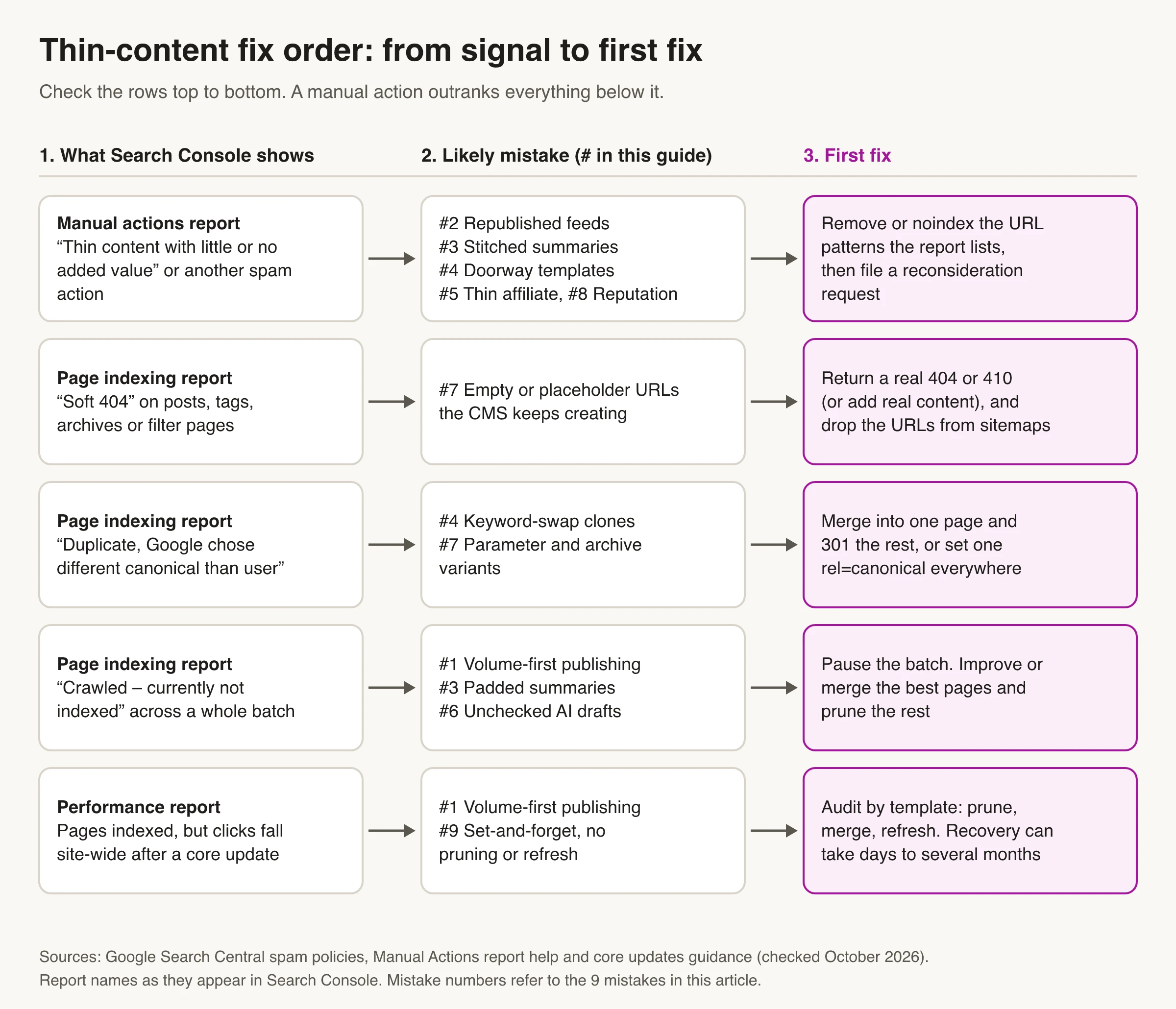
If the cause looks technical rather than quality-related, such as robots rules, rendering or canonicals, our guide to pages not indexing walks through those checks.
Fix order: pause, prune, merge, then ask for review
Fix things in the order Google can re-evaluate them. Resubmitting URLs or rewriting prompts while the low-value pages are still live doesn’t change what Google sees.
- Pause the batch. Switch the pipeline to drafts or stop it, so the problem stops growing while you fix it.
- Remove what can’t be saved. Google’s core updates guidance calls deleting content a last resort. It adds that if whole sections were made for search engines rather than people, deleting them can help the good content on your site perform better. Return a 404 or 410 and take the URLs out of sitemaps and internal links. If you’d rather keep the pages for visitors, Google’s spam policies say to exclude scaled content from Search, which in practice means noindex.
- Merge overlap. Where two posts answer the same question, combine the best parts into one and 301 the other URL to it.
- Canonicalize variants that must stay reachable, and make tags, sitemaps and internal links agree.
- Improve what’s left. Add the missing value (see mistake 3) to the pages you keep.
- Request reconsideration only if there’s a manual action. Explain what you removed, what you merged, and what changed in the pipeline so the same batch can’t come back.
- Wait and watch. Track whether the pages you kept stay indexed and the removed ones drop out. Google says this can take anywhere from a few days to several months.
Resubmitting doesn’t fix quality. Sitemaps and indexing requests only ask Google to crawl, and IndexNow pings don’t reach Google at all. IndexNow’s list of participating search engines includes Bing, Yandex, Seznam, Naver and Yep, but not Google.
Programmatic and template pages: what to index and what to block
Programmatic SEO means building many pages from one template and a dataset. It’s the kind of autoblogging most likely to drift into doorway territory, but it can be legitimate. Run it as governance, not volume:
- Write an index allowlist. List the URL patterns that may be indexed. Everything else is noindexed, canonicalized or never created.
- Set a uniqueness rule for each page. Every indexable page needs data that answers its query on the page itself: real prices, specs, availability or local details. If two rows would produce pages that satisfy the same searcher, they’re one page.
- No funnels. If many pages exist mainly to send visitors to the same destination page, they shouldn’t be indexed.
- Pilot before you scale. Publish a small, representative set. Check how it gets indexed and whether the pages really read as different, then expand the dataset.
- Pick a faceted-navigation policy. Google’s faceted navigation guidance describes two paths. You can block filter URLs, with a robots.txt disallow or by putting filters in URL fragments, which Google generally doesn’t crawl. Or you can deliberately allow a small set and keep them clean, with a consistent filter order and a 404 for combinations that return no results.
If you can’t name who keeps the dataset accurate, don’t scale it.
Limits even a careful autoblog setup has
Avoiding the nine mistakes keeps you on the right side of Google’s policies. It doesn’t remove the limits of automation:
- An originality ceiling. Automation can organize and explain what’s already known. It can’t run tests, interview customers or share experience you don’t have. Posts that need those things need a person.
- Fragile inputs. Feeds change format, APIs throttle or expire, and sources disappear. A pipeline that depends on one input can publish empty or broken posts without anyone noticing. Monitor fetch failures and gaps in publishing, not just output.
- Review capacity. Health, money, legal and safety topics need expert review. If you can’t review everything you publish in those areas, don’t automate them.
- Rights and disclosure. Image and text licenses, attribution and affiliate disclosures don’t scale on their own. Keep a record of sources and permissions for each post.
- Ongoing upkeep. Plugins update, models change, prompts drift and links rot. Someone has to own changes, test them before they reach production and roll them back when needed.
For the same kind of list across SEO automation more broadly, see the limits of AI SEO automation.
What a safe autoblogging setup looks like
A setup that holds up has checks both before and after publishing.
Before a post goes live:
- It targets one intent that no existing page already covers. Planning topic clusters and a keyword map first makes that easy to check.
- It adds something the ranking pages don’t.
- Facts, figures, dates and product details are checked against primary sources and linked.
- Titles, meta descriptions, structured data and alt text are reviewed, not just the body.
- Internal links point to related pages, and no new tag or archive URL is created by default.
- A named person or team is accountable for it.
After it goes live:
- Indexing is checked by template or batch, not page by page.
- Overlapping posts are merged and the old URL is redirected.
- Posts that lose clicks or go out of date are refreshed or retired on a schedule.
How Skribra handles these safeguards
Skribra is our product. Here’s what it does, based on its own feature documentation, and where it stops:
- Review before publishing. You can approve each article before it goes out, or let articles publish automatically.
- Keyword checks. New keywords are checked against your existing coverage so new posts don’t cannibalize pages you already rank for, and off-topic or nonsensical keywords are filtered out.
- Sources and links. Articles are researched from live sources, and external citations and internal links are added during writing.
- Overlap and thin-page review. The Curator agent reviews published articles about once a month for cannibalization and for thin, dated or duplicate pages. It recommends a rewrite, a 301 redirect, noindex or removal, and nothing changes until you approve it.
- Upkeep. Maintenance agents refresh older and underperforming posts, using Search Console data to pick which ones (automatic content refresh). All five come with the Pro plan.
What it doesn’t do: it can’t run your product tests or add firsthand experience, so posts that depend on those still need your input. It publishes to WordPress, Webflow, Notion and Shopify, or to other sites through a webhook. If you’re comparing autopilot tools on these points, see our roundup of Autoblogging.ai alternatives.
Autoblogging Is a Publishing Method, Not a Strategy
Google doesn’t penalize autoblogging. It penalizes what careless autoblogs produce: lots of interchangeable pages made to rank. If you’re already seeing the damage, read the Manual actions report first, then look for patterns in Page indexing. Pause the pipeline and fix in order: remove, merge, canonicalize, improve, and request reconsideration only if there’s a manual action. If you’re setting up automation, build the checks first: one page per intent, something new in every post, a fact check before publishing, and an owner for everything that’s already live.
Frequently Asked Questions
- Is autoblogging bad for SEO?
- Not by itself. Google judges pages by their value, not by how they were made. Autoblogging becomes a problem when it produces many similar, low-value pages mainly to rank, which Google's scaled content abuse policy prohibits whether people, AI or both wrote them.
- Does Google penalize AI-generated content?
- No. Google says appropriate use of AI or automation is not against its guidelines. What it acts on is using AI or other tools to generate many pages without adding value for users. Google also advises fact-checking AI content, including titles and meta descriptions, before publishing.
- Is autoblogging the same as scaled content abuse?
- No. Autoblogging is a way of publishing, while scaled content abuse is a spam policy about the result. An autoblog crosses the line when it mass-produces pages mainly to manipulate rankings, for example by rewording feeds, stitching together other pages, or generating keyword-swap templates.
- Why are my autoblogged posts "Crawled - currently not indexed"?
- Google fetched the pages but chose not to index them. On autoblogged sites this often hits whole batches that look interchangeable or add little to what's already indexed. Look for overlapping posts and thin templates, merge or remove the weakest, and improve the rest before publishing more.
- How long does it take to recover from thin content problems?
- It depends on the kind of problem. A manual action is lifted after Google reviews and accepts your reconsideration request. For algorithmic drops, Google says improvements can show within a few days but may take several months, sometimes not until the next core update.
Automate Publishing With the Safeguards Built In
If you want the speed of autoblogging without the thin-content risk, Skribra checks new keywords against what you already cover, writes articles with cited sources and internal links, lets you approve each one before it publishes, and flags overlapping or thin posts for you to merge or retire.
Plans start at $19/month for 5 articles, and every plan comes with a 3-day free trial.
Written by
Skribra
This article was crafted with AI-powered content generation. Skribra creates SEO-optimized articles that rank.
Share: