January 7, 2026
·
Updated September 6, 2026
·
11 min read
Best AI Content Tools for SEO Content Writing
A practical collection of the best AI content tools for SEO content writing—choose by workflow, compare all-in-one suites vs. research and drafting tools, evaluate quality/SEO fit and risk, and build recommended tool stacks for your content operation.

If you’ve tried “AI for SEO,” you’ve probably hit the same wall: the tool can write fast, but it doesn’t always write what should rank—or what matches your brand and process.
This collection helps you pick tools based on how you actually produce content: briefing and research, drafting and rewriting, on-page optimization, and full-suite platforms. You’ll also get a use-case comparison, clear evaluation criteria, and a few proven stack ideas so you can pilot quickly without locking into the wrong workflow.
Choose by workflow
Picking an AI content tool is mostly a workflow decision, not a feature hunt. Start with your use case, your team size, and how much control you need over briefs, drafts, and optimization.
Your starting point
Decide what you actually need the tool to do. Then decide how strict your SEO rules are, because that determines how much automation you can tolerate.
If you’re choosing quickly, answer these two questions:
- Do you need ideation, drafting, optimization, or all three?
- Are your SEO requirements flexible, or tightly defined by templates and checklists?
The tighter your requirements, the more you should prioritize controllable workflows over “one-click” drafts.
Outputs that matter
Compare tools by what they reliably produce, not what they claim to “support.” Outputs determine whether your team moves faster or just creates more cleanup.
- Content briefs with intent and angles
- Outlines with section-level guidance
- Drafts that match your structure
- On-page recommendations for gaps
- Internal links and anchors suggestions
If a tool can’t ship your required outputs, it’s a writing demo, not a system.
Guardrails to set
AI tools amplify your process, including your mistakes. Set your non-negotiables before you pick a platform, or you’ll fight the tool later.
Your baseline guardrails should include:
- Factuality checks for claims
- Brand voice and terminology rules
- Plagiarism policy and thresholds
- Citation requirements when needed
- Human editorial review pre-publish
Guardrails are how you scale without shipping confident nonsense.
Pricing reality check
Pricing looks simple until you scale across dozens or hundreds of pages. Credits, seats, and usage caps can change your “per-article” cost fast.
- Credits tied to word count
- Seats required for collaboration
- Limits on projects or domains
- Add-ons for optimization features
- API or integration pricing
Price the workflow you’ll run, not the plan you hope you’ll fit into.
All-in-one platforms
You want one hub because switching tools kills momentum and creates version chaos. These platforms bundle research, briefs, drafting, and optimization into a single workflow. If you’re weighing options, see top AI content platforms compared.
Surfer SEO
Use Surfer when you want on-page guidance that stays glued to the draft. It shines for individual pages where you need clear targets and immediate feedback.
Expect features like a content score, term suggestions, and structure nudges based on top-ranking pages. Pair it with your own judgment on intent and usefulness, not just word counts.
Treat it like guardrails, not autopilot.
Clearscope
Use Clearscope when writers need focus, not knobs. It gives strong keyword and topic coverage guidance without making the document feel like a cockpit.
You’ll typically work from a primary keyword, a list of related terms, and a grade-style content target. Editors like it because the guidance is readable, and the writing still feels human.
It’s the calm interface that keeps output consistent.
Frase
Use Frase when you want the SERP to turn into a brief fast. It’s built for outlining, drafting, and especially refreshing older posts that lost traction.
Common flows include pulling competitor headings, assembling question sets, drafting sections, then updating the page with coverage improvements. It’s less about perfection and more about speed with direction.
If you publish often, cadence becomes your advantage.
MarketMuse
Use MarketMuse when the problem is bigger than one page. It helps when you manage many URLs and need a plan for what to create, improve, consolidate, or delete.
You’ll see topic models, coverage gaps, difficulty signals, and suggestions for internal linking and cluster planning. It’s most useful when you’re coordinating multiple writers and trying to avoid cannibalization.
Strategy beats hustle when you have a portfolio.
Jasper
Use Jasper when brand voice and production workflows are your bottleneck. It’s strong for templates, reusable components, and collaboration across a team.
You’ll usually bring your own SEO tool for scoring and term coverage, then use Jasper to generate drafts, variants, and on-brand rewrites. Think campaign pages, product narratives, and consistent tone across contributors.
Get the voice right first, then optimize what earns the click.
Brief and research tools
You still want humans writing the final copy. These tools speed up SERP analysis, competitor coverage checks, and content briefing so your writer starts ahead, not from scratch.
AlsoAsked
You use AlsoAsked when you need question-led subtopics straight from People Also Ask. It helps you shape section headers and FAQs around real search intent.
It’s especially useful for:
- Building an outline from PAA clusters
- Spotting follow-up questions competitors ignore
- Separating “beginner” vs “advanced” sections
Treat the output as structure, not truth, then confirm each question’s intent on the SERP.
AnswerThePublic
You use AnswerThePublic when you want fast, visual idea maps for a topic. It’s great for finding long-tail angles before you spend time validating them.
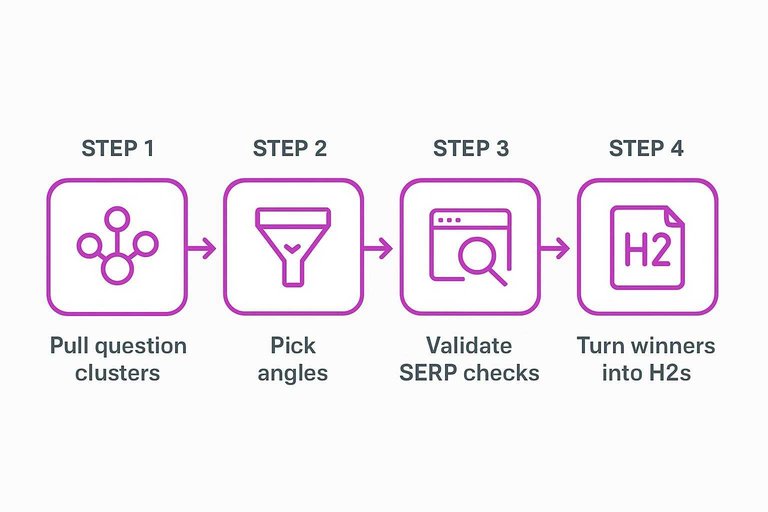
A simple workflow:
- Pull question clusters around your seed term
- Pick angles that match your product or audience
- Validate terms with live SERP checks
- Turn winners into H2s and FAQs
The map gives you breadth, but the SERP decides what deserves a paragraph.
Semrush SEO Writing Assistant
You use Semrush SEO Writing Assistant when you already run your workflow inside Semrush. It keeps briefs, readability, and on-page guidance close to the draft.
It works well for:
- Turning target keywords into a quick brief
- Checking tone and readability consistency
- Catching missing on-page basics early
- Keeping writers inside one toolset
It won’t replace your editorial judgment, but it reduces the easy-to-miss mistakes.
Ahrefs
You use Ahrefs when you need strong keyword discovery and competitor gap ideas. It’s a research engine that helps you decide what to write, and what to skip.
Use it to:
- Find keywords tied to the same intent
- Spot subtopics competitors cover repeatedly
- Identify gaps in competitor content
- Build a brief your writer can trust
Once you have the plan, draft wherever you write best and keep Ahrefs as your compass.
Drafting and rewriting
AI writing assistants shine when you already have a decent brief and need usable pages fast. They’re best at first drafts, rewrites, and controlled variations that keep structure intact. Your edge is still the brief, the examples, and the editorial constraints you enforce.
ChatGPT
Use ChatGPT when you need flexible drafting and fast iteration across formats. It’s strong at turning a tight outline into a readable first pass, then rewriting sections in a specific voice.
Imagine you have a brief, three competitor notes, and a target SERP intent. Paste the outline, define tone rules, then request one section at a time with constraints.
Treat it like a drafting room, not an author.
Claude
Use Claude when your inputs are long and you care about coherence across many paragraphs. It tends to preserve context better and makes fewer sudden tone jumps during edits.
Feed it the full brief, style rules, and prohibited claims, then ask for a single long draft. Follow with targeted edits like “tighten section 3” or “reduce hedging.”
It’s a good choice when consistency matters more than speed.
Copy.ai
Use Copy.ai when you need many variations quickly for small blocks of text. It’s handy for intros, meta descriptions, landing sections, and repurposed snippets.
Start from your core angle, then generate multiple options per block. Pick one, then do one more pass for brand voice and factual checks.
Speed wins when you’re testing messaging, not writing chapters.
Writesonic
Use Writesonic when you want blog drafting plus packaged rewrite and summary workflows. It’s built for taking an existing piece and producing trimmed versions, expansions, or alternate angles.
Draft the post from your outline, then run a rewrite for clarity and a summary for internal linking blurbs. Keep your SEO inputs simple and your claims verified.
Workflow tools help most when your process is the bottleneck.
On-page optimization picks
PageOptimizer Pro
Use PageOptimizer Pro when you want a technical checklist that maps closely to SERP patterns. It pushes you toward specific terms, headings, and on-page placements you can tune by hand. Expect to iterate, not “one-click” anything.
The real value is control. You can fix one weak section without rewriting the whole page.
Yoast SEO Premium
Use Yoast SEO Premium when you publish in WordPress and want guardrails inside the editor. It flags basics like title formatting, meta descriptions, readability, and internal link gaps. It’s less about “what Google wants” and more about preventing self-inflicted SEO mistakes.
If you ship lots of pages, consistency beats brilliance.
Rank Math
Use Rank Math when you want WordPress optimization controls with more knobs than beginner plugins. It covers on-page fields, indexing settings, and schema options without forcing a rigid workflow. You’ll get more flexibility, but you’ll also need clearer standards for your team.
More configurability is only useful if you decide what “good” looks like.
Link Whisper
Use Link Whisper when internal linking slows you down or gets forgotten. It suggests links while you write, helps surface orphaned pages, and nudges anchor text toward clarity. It won’t replace strategy, but it removes the repetitive busywork.
Internal links are compounding assets, so automation pays off fast.
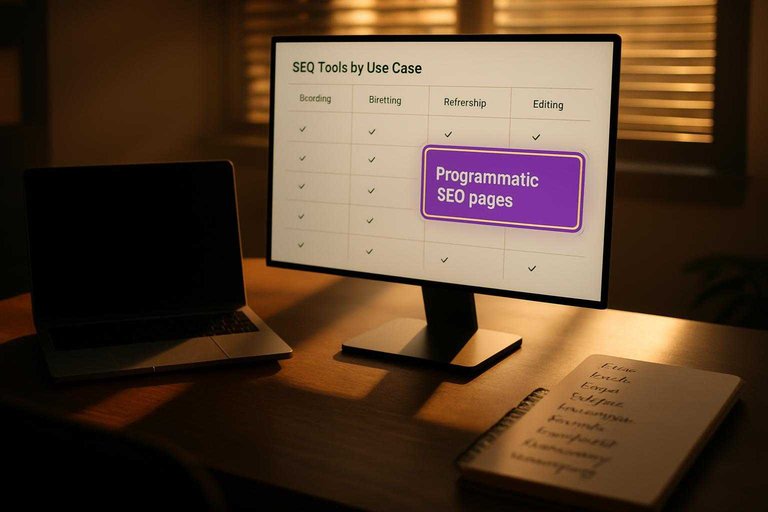
Comparison: best by use case
Pick a tool based on your workflow, not the hype. Different SEO tasks fail for different reasons, so the “best” tool depends on the constraint.
| Use case | Best-fit tools | Why it fits | Watch for |
|---|---|---|---|
| Keyword-to-outline planning | Frase, Surfer | SERP-driven structure | Similarity risk |
| First-draft blog writing | Jasper, Copy.ai, Skribra | Fast templated drafts (or daily SEO-ready posts when you want publishing consistency) | Generic tone |
| Refreshing old posts | Clearscope, Surfer | Gap-based updates | Over-optimization |
| Programmatic SEO pages | Byword, AirOps | Scalable generation flows | Data QA needs |
| Editing for clarity | Grammarly, Hemingway | Cleaner, tighter prose | Losing nuance |
Pick one tool for research, one for writing, and one for editing. Stacking roles beats hunting for a unicorn — unless your main constraint is shipping SEO-formatted articles on a schedule, in which case an end-to-end workflow with WordPress publishing baked in can reduce tool sprawl. If you’re deciding between Byword and Skribra specifically, see Byword vs. Skribra workflows.
How to evaluate tools
Ignore demos and score tools like you’d score a draft. You’re buying repeatable output, not a clever prompt window.
Content quality signals
Judge the draft like an editor, not a power user. You want consistent usefulness under real constraints.
- Matches the search intent cleanly
- Covers the topic end-to-end
- Uses specific, verifiable details
- Adds non-obvious original angles
- Formats for scanning and action
If the draft needs “hero editing” every time, the tool isn’t the tool.
SEO fit signals
A tool can write well and still miss the SERP. Check whether it steers you toward what already wins.
- Mirrors SERP structure and angles
- Expands entities and subtopics naturally
- Suggests relevant internal links
- Flags pages that need refreshing
If it can’t explain why a suggestion matters, it’s guessing with confidence.
Workflow and integrations
The best tool is the one your team will actually use every week. Friction kills adoption, even when output looks great.
Check four areas:
- Where drafts live: Google Docs, CMS, or both
- How publishing works: WordPress, headless, or manual paste
- How collaboration works: comments, suggestions, versioning
- How automation works: API, webhooks, and templates
Choose the tool that fits your pipeline first, then optimize prompts.
Risk and compliance
AI risk is mostly process risk. Your tool should support verification, not fight it.
Look for:
- Hallucination controls and citation support
- Clear handling of YMYL topics and advice language
- Plagiarism checks or easy third-party integration
- Disclosure options that match your policy
- A defined fact-check path for editors and SMEs
If you can’t verify claims quickly, you’ll either ship errors or ship nothing.
Pilot test steps
Run a small trial that forces real tradeoffs. Keep everything identical except the tool.
- Pick 3–5 pages with clear goals.
- Write one brief and lock it.
- Draft in two tools using the same inputs.
- Optimize both with the same on-page checklist.
- Review both with one editorial rubric.
If one tool wins only when you “baby” it, it’s not winning.
Recommended tool stacks
Pick a stack based on how many people touch a page, and how strict your SEO process is. Budget matters, but workflow friction matters more—use this checklist for streamlining SEO content to tighten your process before adding more tools.
- Starter stack: ChatGPT + Google Docs + Search Console
- Solo SEO stack: ChatGPT + Ahrefs or Semrush + Surfer
- Editorial stack: Jasper + Clearscope + Google Docs
- Programmatic stack: Custom GPTs + Screaming Frog + Looker Studio
- Enterprise stack: Writer + Semrush + Contentful
If you can only pick one default, run the Solo SEO stack and add rigor before adding tools.
Pick a Stack and Run a Small Pilot
- Start with your bottleneck: research/briefs, drafting, or on-page optimization—then choose one primary tool for that stage.
- Add only one “supporting” tool (e.g., question research + drafting, or brief tool + optimizer) to avoid overlapping features and costs.
- Pilot on 3–5 articles: measure brief completeness, editing time, on-page checks, and how consistently the output matches your standards.
- Keep what integrates cleanly with your CMS and review process, and drop anything that forces extra steps, increases compliance risk, or creates content you don’t trust.
Frequently Asked Questions
- Are AI content tools safe for SEO in 2026, or can they cause ranking issues?
- AI-assisted content is usually safe when you publish for users first: verify facts, add original expertise, and avoid spinning near-duplicate pages. The biggest risks come from thin, unedited drafts, scaled duplication, or inaccurate information—not from using AI itself.
- How do I detect and prevent AI hallucinations in SEO blog posts?
- Treat AI output like a first draft: require sources for claims, cross-check with primary documentation, and run a final SME/editor review before publishing. Use a “citations required” step in your workflow for any stats, medical/legal advice, or product comparisons.
- Can I use AI content tools to update existing posts instead of writing new ones?
- Yes—many teams get faster wins by refreshing pages: expand missing subtopics, tighten headings, improve internal links, and rewrite intros/meta descriptions to match search intent. Track changes in Google Search Console (queries, CTR, average position) to judge whether the update helped.
- What’s the best way to keep brand voice consistent when multiple writers use AI writing tools?
- Create a shared style guide and prompt library (voice, forbidden phrases, formatting rules), then use a single review checklist for every draft. Lock in reusable blocks like intros, CTAs, and FAQ tone so outputs stay consistent across authors.
- Which AI content tool is best if I want to publish SEO articles directly to WordPress?
- Look for native WordPress publishing, draft scheduling, and the ability to control titles, meta descriptions, headings, and images from one place. If WordPress push-button publishing is your priority, Skribra is built for that workflow and can reduce copy/paste steps.
Automate Your SEO Content Stack
After comparing tools by workflow and use case, the real challenge is turning a recommended stack into consistent, publish-ready output every day.
Skribra brings research, SEO briefs, optimized drafting, images, and WordPress publishing into one workflow—plus a backlink exchange network—so you can scale output with a 3-Day Free Trial.
Written by
Skribra
This article was crafted with AI-powered content generation. Skribra creates SEO-optimized articles that rank.
Share: