September 13, 2026
·
Updated October 28, 2026
·
14 min read
SERP Features vs On-Page SEO: Which Wins More Clicks?
A 2026 guide to Google SERP features: which ones you can win, what Google's documentation says about eligibility, what independent studies show about clicks by layout, and how to decide per query whether on-page SEO or a feature is the better bet.

SERP features are the extra elements on Google's results page, such as featured snippets, People Also Ask, sitelinks, rich results, local packs and AI Overviews. They set how many clicks a query has to give. On-page SEO decides how many of those clicks you get. So the practical answer to "which wins clicks" is on-page SEO on queries where the page still sends people out, and a specific feature only when Google already shows it for that query and your content can qualify.
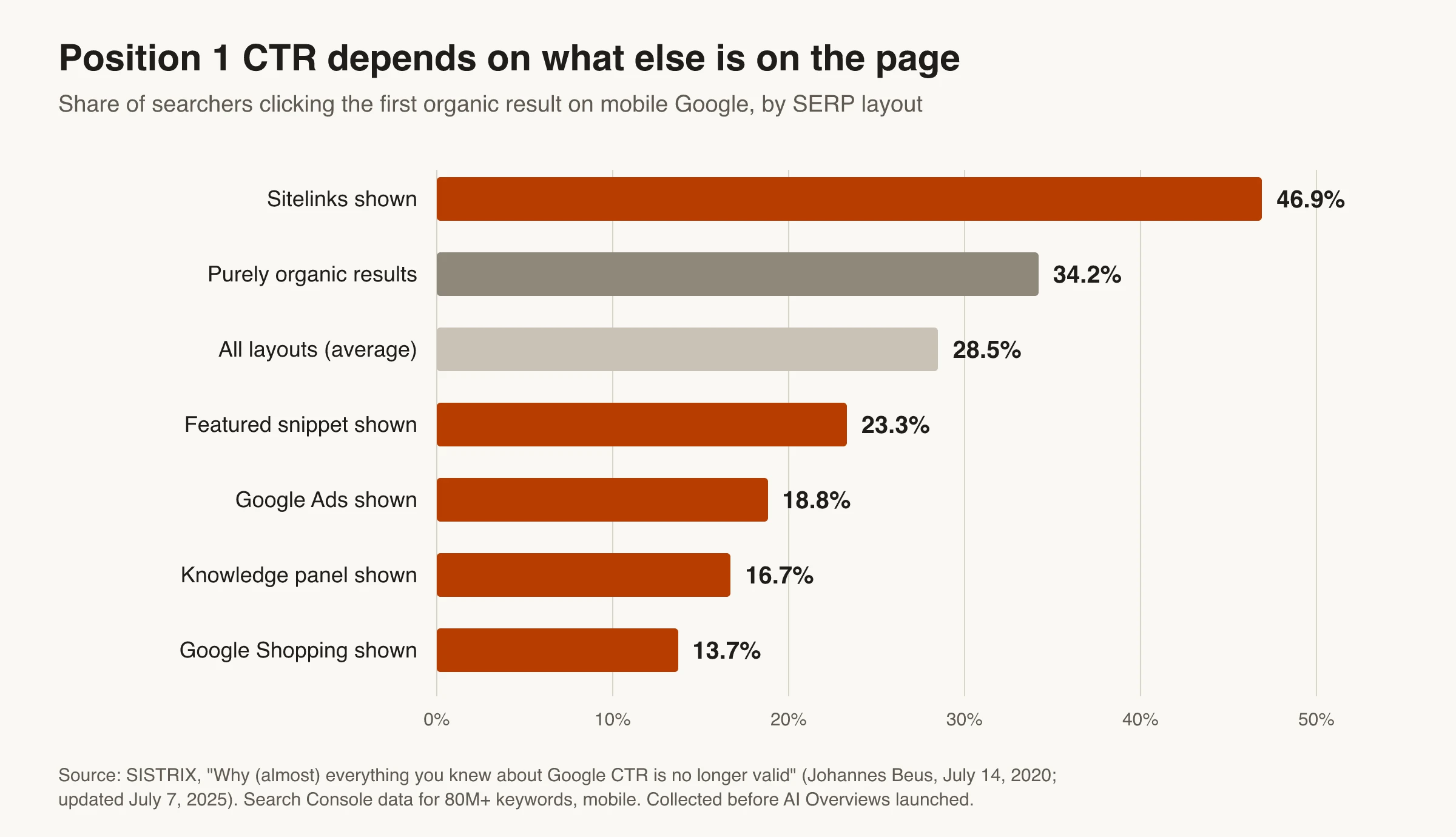
The layout effect is large. In SISTRIX's mobile CTR study, the first organic result got 34.2% of clicks on a purely organic page and 13.7% when Google Shopping was shown. Ahrefs found that an AI Overview correlates with a 58% lower click-through rate for the top result. Below you'll find a catalog of the main features with Google's own eligibility rules, what the click studies show (and how old each one is), and a per-query rule for picking your next sprint.
What are SERP features?
A SERP feature is anything on a search engine results page that isn’t a plain blue link with a text snippet: an answer box, a carousel, a map, a panel, a block of questions, or an AI-written summary. Google’s own gallery of Search visual elements splits the page into text results, rich results, image and video results, and “exploration features” such as related questions and related searches, which Google says you can’t control.
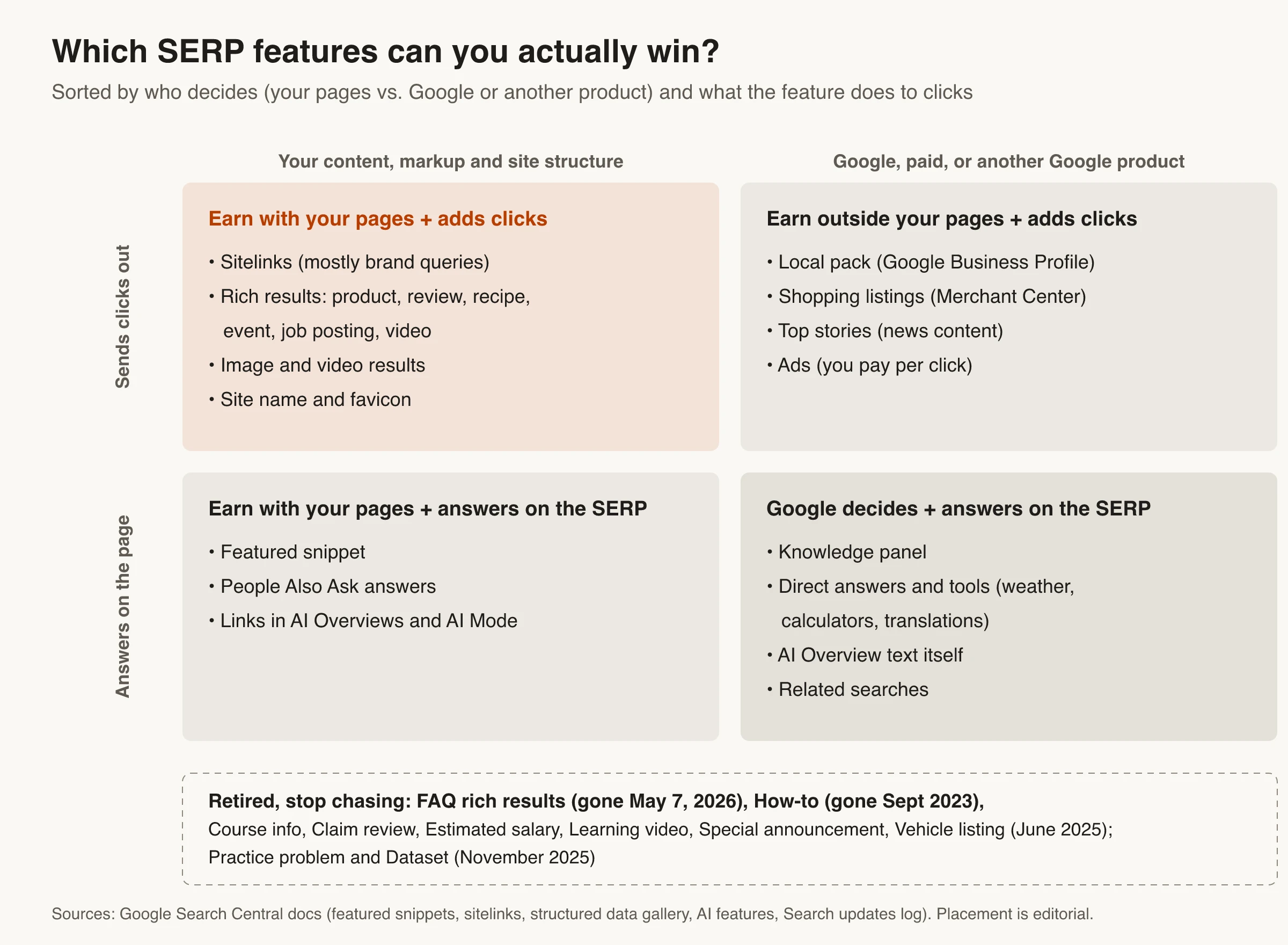
Features affect clicks in two opposite ways. Some give your listing more room or more reasons to click, like sitelinks, review stars or a video thumbnail. Others answer the question on the results page or push organic results down the screen, like a knowledge panel, a shopping grid or an AI Overview. Knowing which kind you’re dealing with is most of the decision.
SEO vs SERP: what’s the difference?
SEO is the work. The SERP is where the work shows up. Search engine optimization covers what you change on your own site: content, titles, headings, structured data, internal links and technical setup. The SERP is the page Google assembles for one query, from its index, its own products and ads.
On-page SEO gives Google candidate material, and Google decides which pieces to show and in which feature, query by query. That’s why the same page can appear as a plain result for one search, a featured snippet for another and a cited link inside an AI Overview for a third.
How the SERP layout caps your clicks
Before you choose between a copy sprint and a feature sprint, look at how much each layout leaves for organic results. The most detailed public breakdown by layout is still SISTRIX’s study of Search Console data for more than 80 million keywords on mobile.
Four more recent studies cover zero-click searches and AI answers. Each measures something different, so compare them by method, not just by headline number.
| Study | Data | Finding |
|---|---|---|
| SISTRIX, July 2020 (updated 2025) | Search Console data, 80M+ keywords, mobile | Position 1 CTR ranged from 13.7% (Shopping shown) to 46.9% (sitelinks shown), 28.5% on average |
| SparkToro and Datos, July 2024 | Clickstream panel, desktop and mobile, US and EU | 58.5% of US and 59.7% of EU Google searches ended without a click; 360 of every 1,000 US searches sent a click to the open web |
| Pew Research Center, July 2025 | Browsing data from 900 US adults, March 2025 | People clicked a traditional result in 8% of visits when an AI summary appeared vs 15% without one; 1% clicked a link inside the summary |
| Ahrefs, February 2026 | Search Console data, 300,000 keywords, desktop, Dec 2023 vs Dec 2025 | An AI Overview correlates with a 58% lower average CTR for the top-ranking page |
| Wang et al., August 2026 preprint | Preregistered field experiment, 1,100 US participants | Hiding AI features raised external click-through by 8.8 percentage points; an AI Mode-only experience cut it by 18.8 points |
Read the caveats before you quote any of these. The SISTRIX curves were collected before AI Overviews existed, so use them for the relative gap between layouts, not as today’s benchmarks. The Ahrefs figure is a correlation against a modeled baseline and covers desktop only. In the field experiment, a Google HTML change broke the tool that hid AI Overviews, so only 51.1% of them were actually hidden; the authors adjust for that, but the 95% confidence interval runs from 2.3 to 15.3 points. Participants came from Prolific and a university work-study program, skewed younger and more educated than the US population, and were observed for seven days.
The direction is consistent across all five. Features that answer the query on the page shrink the organic share. Features that extend your own listing grow it. The sitelinks number is mostly a navigational effect: SISTRIX links it to searches where people are looking for one specific site, and those searchers were likely to click that site anyway. For the click-through rate you can actually influence, the useful comparison is your CTR against your own median at the same position and layout, which our guide to SERP metrics worth tracking walks through.
SERP features you can win, and how (2026 catalog)
Here is every major Google feature sorted by who controls it, with the eligibility rule from Google’s documentation. “Win” means you can become eligible; Google still decides, query by query, whether to show it.
| Feature | Can you win it? | What makes you eligible |
|---|---|---|
| Title link and snippet | Yes, every indexed page | A descriptive title, a matching main heading, a useful meta description. Google may rewrite any of them |
| Featured snippet | Sometimes | Ranking on page one with a direct, quotable answer. No markup can force it |
| People Also Ask | Sometimes | Same as featured snippets; Google shows snippet-style answers inside the questions block |
| Sitelinks | Mostly for brand searches | Clear site structure, informative titles and headings, concise internal anchor text |
| Rich results (product, review, recipe, event, job posting, video, Q&A, discussion forum and others) | Yes, if your content type is supported | Valid structured data that matches visible content |
| Site name and favicon | Yes | WebSite structured data on the home page and a favicon that meets Google’s guidelines |
| Breadcrumb trail | Desktop only since January 2025 | BreadcrumbList structured data |
| Links in AI Overviews and AI Mode | Sometimes | Indexed and eligible for a snippet, and not excluded in Search Console. No special markup |
| Local pack, Shopping listings | Yes, through other Google products | Google Business Profile; Merchant Center feeds plus Product markup |
| Knowledge panel, direct answers, related searches | No, or only indirectly | Google-owned. Organization or LocalBusiness markup can feed a panel, but Google decides |
| FAQ and How-to rich results | No, retired | FAQ stopped showing May 7, 2026; How-to in September 2023 |
Features you earn with content and site structure
Your title link and snippet are the only features every page gets. Google generates title links automatically from the title element, main heading, other prominent text and links pointing to the page. Snippets come mainly from page content, with the meta description used when it describes the page better. If you’re deciding what goes in the title vs the URL, the title carries far more weight.
Featured snippets come from the same pool. Google’s featured snippets documentation answers the question “How can I mark my page as a featured snippet?” with “You can’t.” Its systems pick pages that answer the query well and show them only when enough text fits. The practical lever is format: a heading phrased like the question, a direct answer of a sentence or two right under it, then the detail, with a list or table where the answer really is a list or table. The same content feeds People Also Ask, since Google notes featured snippets can appear inside the related questions group.
Holding the snippet isn’t automatically a click win. In the SISTRIX data, position 1 with a featured snippet earned 23.3% against the 28.5% average, and positions 2 and 3 on those pages gained clicks. Win a snippet when the query needs more than the snippet can show, like steps, comparisons or a decision, so people still have a reason to click through.
Sitelinks are fully automated. Google says it shows them only when they’ll be useful and builds them from your link structure, so the work is information architecture: informative titles, a logical structure, and short, relevant internal anchor text.
Features you earn with structured data
Rich results are the most winnable features, as long as your content is a type Google supports. As of October 2026, Google’s structured data gallery lists Article, Breadcrumb, Carousel, Course list, Dataset (now used only by Dataset Search), Discussion forum, Education Q&A, Employer aggregate rating, Event, Image metadata, Job posting, Local business, Math solver, Movie, Organization, Product, Profile page, Q&A, Recipe, Review snippet, Software app, Speakable, Subscription and paywalled content, Vacation rental and Video. If you publish affiliate review pages, any review markup has to match what the page visibly shows.
Schema markup gets you eligible, nothing more. Google’s general structured data guidelines say it “does not guarantee” your structured data will show, even when the Rich Results Test passes, and that markup has to describe content visible on the page. Use JSON-LD, which Google recommends. To draft Article or LocalBusiness markup quickly, the free schema generator outputs a ready-to-paste JSON-LD block. Skip its FAQ and How-to options if your goal is a Google rich result, since neither displays in Google anymore.
Retired features to stop chasing
SERP features get retired, and work spent on them stops paying off. Google’s Search documentation updates log records that FAQ rich results no longer appear in Google Search starting May 7, 2026, and the FAQ documentation was removed in June 2026. How-to rich results were deprecated on September 13, 2023. In June 2025 Google announced it was phasing out seven more types: Book actions, Course info, Claim review, Estimated salary, Learning video, Special announcement and Vehicle listing. In November 2025 the same log shows Google keeping Book actions, because another Search feature still uses that markup, and adding Practice problem and Dataset to the types leaving Google Search results.
You don’t need to strip old FAQ or How-to markup. When Google first cut back FAQ and How-to results in 2023, it said structured data that isn’t being used doesn’t cause problems for Search. Just stop counting on it for clicks, and keep useful questions and answers on the page for readers.
AI Overviews and AI Mode: what you control in 2026
You can’t win an AI Overview the way you win a rich result, but you do control three things: whether you’re eligible, how you measure it, and whether you take part at all.
Eligibility. Google’s AI features documentation says a page must be indexed and eligible to show with a snippet, and that there are “no additional requirements” or special schema for AI Overviews or AI Mode. Its guide to optimizing for generative AI features (updated July 2026) adds a third condition: your site must be included in Search generative AI features in Search Console. The same guide says you can ignore llms.txt files, “chunking” content into small pieces, and rewriting pages just for AI systems.
Measurement. The Generative AI performance report in Search Console, rolled out to all sites worldwide on August 31, 2026, shows impressions in AI Overviews and AI Mode by page, country, device and date. It doesn’t show clicks. Clicks and impressions from AI features also sit inside the main Performance report under the Web search type, where Google counts an AI Overview as a single position shared by every link in it.
Participation. The Search generative AI control, under Settings in Search Console, has three options: include (the default), exclude, or inherit from a parent property. Excluding removes your links and content from AI Overviews, AI Mode and generative AI features in Discover, typically within a few days. You then get no impressions or traffic from those features. Google says the control isn’t a ranking signal for the rest of Search and doesn’t affect AI training, which is handled separately by Google-Extended. Page-level rules like nosnippet, data-nosnippet and max-snippet also limit what AI features can show, but they limit your regular snippets too.
Should you opt out of AI Overviews?
For most sites, no. Excluding your site doesn’t remove the AI Overview from the results page. Google says content from other sites will still be available in those features. The +8.8-point lift in the field experiment came from hiding AI features from searchers, which no publisher can do for its own queries. Opting out gives up your citations and impressions in the summary without bringing back the blue-link clicks the summary absorbs.
Opting out makes more sense as a content-licensing decision than a CTR tactic, for example when your business depends on content you don’t want summarized. If you’re testing it, record the switch date and compare equal windows before and after in the Performance report.
On-page SEO vs SERP features: which wins clicks?
Neither wins everywhere. Here’s how the two compare on the things that decide a sprint.
| Question | On-page SEO | Chasing a SERP feature |
|---|---|---|
| Who decides what shows | You supply title, snippet text and headings; Google may rewrite them | Google decides per query; markup or format only makes you eligible |
| Effect on clicks | Raises your share of the clicks the layout leaves | Listing extensions (sitelinks, rich results) add clicks; answer features (snippets, AI Overviews) can cut them |
| Main risk | Low. Title and meta changes are easy to reverse | Features get retired: FAQ in 2026, How-to in 2023, eight more types in 2025 |
| How you measure it | Query and page CTR in the Performance report | Search appearance filter for rich results; Generative AI report for impressions only |
| Best bet when | The layout is mostly organic and you rank 2 to 10 with below-par CTR | The feature already shows for the query and matches your content type |
A per-query decision rule
Run each priority query through these checks, in order, and stop at the first one that applies.
- Look at the live SERP on mobile and desktop. Note everything above the first organic result. Results vary by location and device, so check more than once.
- Google answers it on the page. Direct answers, a knowledge panel or an AI Overview that fully settles the question mean few clicks are on offer for anyone. Don’t spend a copy sprint here. Target the follow-up questions where people need a page, and watch your impressions in the Generative AI report.
- A featured snippet or People Also Ask shows, and you rank on page one. Run a format sprint on the answer blocks described above. Pick queries where a snippet can’t finish the job, like steps, comparisons or decisions.
- A rich result type fits your content and competitors already show it. Run a structured data sprint, validate it in the Rich Results Test, then watch the matching Search appearance filter.
- The layout is mostly organic and you rank 2 to 10 with CTR below your own median for that position. Run an on-page sprint on titles and meta descriptions. On-page SEO tools can flag missing or duplicate tags, but judge the rewrites yourself. Preview each rewrite with the SERP preview tool before you ship it. If Google keeps rewriting your titles or hiding your snippet, our list of results-page errors that crush organic CTR covers the causes.
- It’s a brand query. Work on site structure and site name markup, which is what sitelinks and your site name are built from.
Most queries end at step 5. That’s why on-page SEO wins more clicks overall even though some features clearly change the layout: it’s the lever that applies to almost every page you have, and it can’t be retired.
How to test a SERP feature bet in Search Console
A feature sprint is only worth repeating if you can show it moved clicks. Google Search Console can show this, within limits.
- Lock a test group and a control group. Pick the pages you’ll change and a similar set you won’t touch, then save both filters in the Performance report so every comparison uses the same pages.
- Segment rich results with Search appearance. The Search appearance dimension groups data by result type, like review snippets, product snippets or videos. It only lists types your site has impressions for, and it doesn’t separate featured snippets, People Also Ask or sitelinks.
- Track AI features separately. Use the Generative AI performance report for impressions. Clicks from AI features stay mixed into the Web search type, so look for changes at the page level rather than expecting a clean AI click count.
- Compare equal windows before and after. Use the same weekdays and length, keep devices split, and note confirmed Google updates so you don’t credit yourself for a layout change Google made.
- Watch aggregation. CTR and average position are usually higher when data is grouped by property than by page, because the property only counts its top result. Compare like with like.
If you want the full measurement setup, including feature ownership rates and AI Overview citation tracking, that’s covered in the SERP metrics guide linked earlier. For a grounding in the on-page basics behind every one of these tests, see our SEO guide.
Pick the Sprint per Query, Not per Site
SERP features set the ceiling on clicks and on-page SEO decides how close you get to it. Treat the two as one decision made per query. Skip the queries Google already answers in full, chase features only where they’re already showing and fit your content, and spend the rest of your time on the titles, snippets and answer blocks you control.
Before the next sprint, pull your top 20 non-branded queries, check each live SERP, and put each one through the decision rule above. Then measure the result against a control group so the next decision rests on your own data rather than someone else’s averages.
Frequently Asked Questions
- What are SERP features in SEO?
- SERP features are the elements on a search results page beyond the standard blue links, such as featured snippets, People Also Ask, sitelinks, rich results, image and video results, local packs, knowledge panels and AI Overviews. In SEO they matter because they change how many clicks organic results get and give some pages extra visibility.
- What is the difference between SEO and SERP?
- SEO is the work you do on your site to rank and earn clicks, such as content, titles, structured data and internal links. The SERP is the results page Google builds for each query. SEO supplies the material, and Google decides how it appears on the SERP.
- Can you optimize a page to win a featured snippet?
- You can make a page a strong candidate, but you can't mark it as one. Google's documentation says its systems decide which pages to show as featured snippets. Rank on page one, put a direct answer right under a heading that matches the question, and use lists or tables where the answer is a list or table.
- Does FAQ schema still get rich results in 2026?
- No. Google stopped showing FAQ rich results in Search on May 7, 2026, for all sites. You don't have to remove existing FAQPage markup, but it won't produce a rich result in Google. Keeping useful questions and answers on the page still helps readers.
- Should I opt out of AI Overviews to get more clicks?
- Usually not. Excluding your site in Search Console removes your links and content from AI Overviews and AI Mode, but the summaries still appear using other sites' content. You lose those impressions and clicks without getting back the clicks the summary takes from blue links.
- How can I see which SERP features my site appears in?
- In Search Console, the Search appearance filter in the Performance report shows rich result types your site has impressions for, and the Generative AI performance report shows impressions in AI Overviews and AI Mode. Neither report covers featured snippets, People Also Ask or sitelinks, so use a rank tracker with SERP feature tracking or manual checks for those.
Fix the Listings You Can Control
Skribra connects to Google Search Console and shows clicks, impressions, CTR and average position for every article it publishes, with up to 16 months of history. Its Hook agent looks for pages ranking at position 6 or beyond with plenty of impressions and a CTR below what their position should earn, then rewrites only the title and meta description. It leaves pages that already earn traffic alone and waits 60 days before touching the same article again.
Plans start at $19/month, the $75 Pro plan runs all five maintenance agents on every article, and every plan comes with a 3-day free trial.
Written by
Skribra
This article was crafted with AI-powered content generation. Skribra creates SEO-optimized articles that rank.
Share: